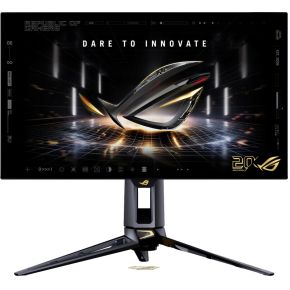
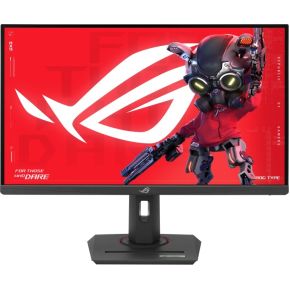
ASUS ROG Swift OLED PG27AQWP-G Edition 27 Quad HD 540Hz Gaming monitor
bij 2 winkels, goedkoopst bij Bol
€1.250,30

De strafste Black Friday deals van België!
De strafste Black Friday deals van België!
 -11%
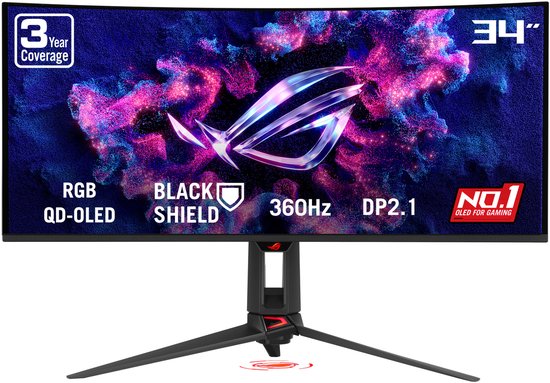
-11%De laagste Black Friday-prijs voor de ASUS ROG Swift PG34WCDN QD-OLED Curved is € 1.249 (bij 4 winkels vergeleken).
Dat is € 50 goedkoper dan de duurste winkel (€ 1.299).
Nu €1.249,00. Laat je adres achter en we mailen je zodra de prijs onder jouw bedrag zakt.
Je krijgt eerst een mail om te bevestigen — pas daarna staat de alert aan. Daarna hoogstens één bericht per week, en in elke mail staat een afmeldlink. Vink je de nieuwsbrief niet aan, dan gebruiken we je adres uitsluitend voor dit ene product. De nieuwsbrief is een aparte inschrijving die je los kan opzeggen.
We volgen de prijs van dit product sinds 2 dagen. Zodra we twee weken aan metingen hebben, verschijnt hier de prijsgrafiek.
Beoordeling van de productexperts van MediaMarkt.
Onderdompelende game-ervaring De zwarte ROG Swift Oled Pg34Wcdn gaming-monitor van Asus biedt je een totale onderdompeling in games en content dankzij het gebogen ontwerp en verbluffende beeldkwaliteit. Het 34-inch (86,7 cm) oled-scherm met een kromming van 1.800R en een ultrawide beeldverhouding van 21:9 geeft alle content weer in een resolutie van 3.440 x1.440 pixels (Uwqhd). Deze combinatie zorgt voor een panoramisch beeld, geschikt voor zowel gaming als multitasking. De hoge verversingssnelheid van 360 Hz en snelle responstijd van 0,03 ms garanderen een soepele en responsieve ervaring, zelfs bij de meest veeleisende games. Geavanceerde beeldtechnologie Asus heeft deze gaming-monitor uitgerust met geavanceerde oled-technologie die zorgt voor diepe zwarttinten en levendige kleuren. Met een contrastverhouding van 1.500.000:1 en een kleurbereik van 99% Dci-P3 worden beelden nauwkeurig en realistisch weergegeven. De Vesa DisplayHDR 400 True Black-certificering garandeert een indrukwekkende HDR-ervaring, waardoor lichte en donkere scènes met veel detail worden weergegeven. Daarnaast is de monitor voorzien van Oled Care Pro om het risico van inbranding te verminderen, en de levensduur van het scherm te verlengen met optimale prestaties. Indrukwekkende monitor voor gaming en multitasking Deze gaming-monitor is perfect voor zowel competitieve gamers als liefhebbers van visueel indrukwekkende games.
Productinformatie aangeleverd door MediaMarkt.
Kan je het scherm bedienen door erop te tikken? Handig om te tekenen of te schrijven, maar het kost wat batterij en het scherm weerspiegelt doorgaans meer.
De verhouding tussen breedte en hoogte van het scherm. 16:9 is de norm voor tv en film. Bredere verhoudingen tonen bioscoopfilms zonder balken, maar geven bij gewone tv wél balken links en rechts.
Het aantal beeldpunten van het scherm. Meer beeldpunten betekent een scherper beeld — vooral als het scherm groot is of je er dicht bij zit.
De diagonaal van het scherm, van hoek tot hoek, meestal in inch (1 inch = 2,54 cm).
Vuistregel voor een tv: meet de afstand van je zetel tot het scherm in centimeter en deel door 4 à 5. Op drie meter zit je zo rond 65 inch.
The product includes AMD Freesync Technology for the dynamic synchronization of the graphic card and the monitor in order to avoid screen tearing.
Indicates whether the product supports NVIDIA G-SYNC technology to synchronize the display refresh rate with the GPU to eliminate screen tearing.
Het product heeft een ingebouwde camera.
The device contains speaker(s) to produce sound.
De kleur (bvb. rood)
Under which category can the device be positioned in the market, e.g. camera phone.
Whether or not the device features a USB hub to connect more than one other device via USB.
Het gatenpatroon achteraan, in millimeter — bijvoorbeeld 400×300. Een muurbeugel past alleen als hij dezelfde maat aankan.
| Gleurengamma DCI-P3 The percentage of the DCI-P3 color gamut that the device is capable of displaying. | 99 procent |
|---|---|
| sRGB-dekking (gemiddeld) The percentage of the sRGB color space that the device is capable of reproducing. | 135 procent |
| Kleurstandaard gamut The specific color space standard the device is designed to reproduce, such as Adobe RGB or DCI-P3. | DCI-P3, sRGB |
| HDR-formaat Welke HDR-varianten het toestel aankan. HDR10 is de basis en werkt overal. Dolby Vision en HDR10+ sturen het beeld scène per scène bij en zien er doorgaans beter uit — als de film of serie het ondersteunt. | DisplayHDR True Black 500, High Dynamic Range 10 (HDR10) |
| HDR High Dynamic Range: het scherm toont donkere en heldere delen tegelijk zonder detailverlies. Een nachtscène blijft zichtbaar, een zonsondergang wordt geen witte vlek. Het verschil is in de praktijk vaak duidelijker zichtbaar dan het verschil tussen 4K en 8K. | Ja |
| Schermdiameter in centimeters This is the size of the display screen | 87 cm |
| Digitale verticale frequentie The range of refresh rates the device can support when operating in digital mode, measured in Hertz (Hz). | 24 - 360 Hz |
| Digitale horizontale frequentie The range of horizontal scanning frequencies the device can support, measured in kHz. | 27 - 625 kHz |
| Grootte beeld (verticaal) De grootte van het daadwerkelijke beeld is vaak kleiner dan de grootte van de monitor, omdat er soms een grote rand om het beeld zit. | 33,7 cm |
| Grootte beeld (horizontaal) De grootte van het daadwerkelijke beeld is vaak kleiner dan de grootte van de monitor, omdat er soms een rand om het beeld zit. | 80 cm |
| Pixel pitch Afstand tussen twee "beeldpunten". Hoe dichter de beeldpunten bij elkaar staan hoe scherper het beeld over het algemeen zal zijn. | 0,231 x 0,231 mm |
| Beeldscherm, aantal kleuren Het aantal kleuren dat een scherm kan weergeven. Meer kleuren zorgen voor vloeiendere kleurovergangen en een realistischer beeld, vooral bij foto’s, films en games. Een scherm met 16,7 miljoen kleuren (8-bit) is de standaard en voor de meeste toepassingen ruim voldoende. 1 miljard kleuren (10-bit) kan zichtbaar betere kleurovergangen geven bij HDR-video en professionele foto- of videobewerking. | 1.073 biljoen kleuren |
| Kijkhoek, verticaal Maximum vertical angle at which a display can be viewed with acceptable visual performance. | 178° |
| Kijkhoek, horizontaal Maximum horizontal angle at which a display can be viewed with acceptable visual performance. | 178° |
| Beeldfrequentie (max.) De hoogste beeldfrequentie die het scherm haalt, in hertz. 60 Hz is genoeg voor film en tv; 120 Hz of meer is vooral merkbaar bij games en sport. | 360 Hz |
| Contrast ratio (dynamisch) A property of a display system | 1500000:1 |
| Typische contrastverhouding De verhouding tussen de hoeveelheid licht van het helderste wit en het donkerste zwart van de display/projector. | 1300:1 |
| Schermkrommingsclassificatie The radius of the curve of the screen, expressed in millimetres (e.g. 1500R), where a smaller number indicates a more pronounced curve. | 1800R |
| Schermvorm Vlak of gebogen. Een gebogen scherm oogt indrukwekkend van dichtbij en alleen recht ervoor; zit je er met meerdere mensen naast, dan werkt vlak beter. | Gebogen |
| Antireflectiescherm Hiermee beschik je zelfs in direct zonlicht altijd over optimaal beeld. | Ja |
| Type reactietijdmeting The method used to measure the time it takes for a pixel to change colors, such as GTG (Gray to Gray) or BwB (Black-white-Black). | GTG (Gray to Gray) |
| Responstijd De responstijd is het tijdsverschil tussen het moment dat de grafische kaart een beeld verstuurt naar de monitor en het moment dat de monitor dat beeld weergeeft. Gewoonlijk moet deze tijd zeker onder de 25ms liggen. | 0,03 ms |
| Aanraakscherm Kan je het scherm bedienen door erop te tikken? Handig om te tekenen of te schrijven, maar het kost wat batterij en het scherm weerspiegelt doorgaans meer. | Nee |
| LED backlight A backlight is a form of illumination used in liquid crystal displays (LCDs). One type of backlight is made by LEDs | Ja |
| Soort paneel The technology used to manufacture the panel, such as AMOLED or AH-IPS. | OLED |
Schermtechnologie
| QD-OLED |
| Beeldverhouding De verhouding tussen breedte en hoogte van het scherm. 16:9 is de norm voor tv en film. Bredere verhoudingen tonen bioscoopfilms zonder balken, maar geven bij gewone tv wél balken links en rechts. | 21:9 |
| Beeldkwaliteit Hoe scherp het beeld is, in de benaming die fabrikanten gebruiken.
| Wide Quad HD |
| Resolutie Het aantal beeldpunten van het scherm. Meer beeldpunten betekent een scherper beeld — vooral als het scherm groot is of je er dicht bij zit.
| 3440 x 1440 Pixels |
| Schermdiagonaal De diagonaal van het scherm, van hoek tot hoek, meestal in inch (1 inch = 2,54 cm). Vuistregel voor een tv: meet de afstand van je zetel tot het scherm in centimeter en deel door 4 à 5. Op drie meter zit je zo rond 65 inch. | 86,4 cm (34") |
| Game modus Indicates whether the device has a dedicated preset that optimizes performance, such as reducing input lag or enhancing contrast, for gaming. | Ja |
|---|---|
| Laag-blauw-licht-technologie Indicates whether the product features technology designed to reduce the amount of harmful short-wave blue light emitted by the screen to decrease eye strain. | Ja |
| Knippervrije technologie Indicates whether the device employs technology to reduce or eliminate screen flickering to decrease eye strain during prolonged use. | Ja |
| VESA Adaptive Sync-ondersteuning Indicates whether the device supports the VESA Adaptive-Sync standard to synchronize the refresh rate with the GPU to reduce screen tearing. | Ja |
| AMD FreeSync-type The specific version of the adaptive synchronization technology supported by the device to reduce screen tearing and stuttering (e.g. FreeSync Premium Pro). | FreeSync Premium Pro |
| AMD FreeSync The product includes AMD Freesync Technology for the dynamic synchronization of the graphic card and the monitor in order to avoid screen tearing. | Ja |
| NVIDIA G-SYNC-type Specifies the version of NVIDIA's adaptive sync technology supported by the device to reduce screen tearing and stuttering (e.g. G-SYNC Compatible). | G-SYNC Compatible |
| NVIDIA G-SYNC Indicates whether the product supports NVIDIA G-SYNC technology to synchronize the display refresh rate with the GPU to eliminate screen tearing. | Ja |
| Ingebouwde camera Het product heeft een ingebouwde camera. | Nee |
|---|---|
| Ingebouwde luidsprekers The device contains speaker(s) to produce sound. | Nee |
| Voetenkleur The colour of the feet | Zwart |
|---|---|
| Kleur De kleur (bvb. rood) | Zwart |
| Markt positionering Under which category can the device be positioned in the market, e.g. camera phone. | Gamen |
| Hoofdtelefoonuitgangen Number of sockets /ports where headphones are connected. | 1 |
|---|---|
| Hoofdtelefoon uit The socket for connecting headphones to the device. | Ja |
| Audio-uitgang The type of audio output that the device produces | Ja |
| DisplayPort versie The specific release version of the DisplayPort standard supported by the device (e.g., 1.2 or 1.4). | 2.1 |
| Aantal DisplayPorts Number of DisplayPorts. A DisplayPort is a digital display interface developed by the Video Electronics Standards Association (VESA). The interface is primarily used to connect a video source to a display device such as a computer monitor | 1 |
| HDMI versie The specific release version of the High-Definition Multimedia Interface standard supported by the device (e.g. 1.3 or 2.0). | 2.1 |
| HDMI-aansluitingen Hoeveel toestellen je tegelijk kan aansluiten: decoder, spelconsole, soundbar, mediaspeler. Reken op één per toestel — een extra poort is achteraf niet bij te bouwen. | 2 |
| HDMI HDMI (High-Definition Multimedia Interface) is a compact audio/video interface for transferring uncompressed video data and compressed/uncompressed digital audio data from a HDMI-compliant device ("the source device") to a compatible computer monitor | Ja |
| USB Power Delivery tot max. The maximum amount of power the device can provide or receive via a USB connection, measured in watts. | 90 W |
| USB-snelladen Een afspraak waarmee toestellen en laders onderling regelen hoeveel stroom er mag vloeien. Met een PD-lader laadt het toestel merkbaar sneller — ook als de lader van een ander merk is. | Ja |
| USB Type-C DisplayPort alternatieve modus Indicates whether the USB Type-C port supports the transmission of native DisplayPort video signals to an external display. | Ja |
| Aantal USB Type-C downstreampoorten The number of USB Type-C ports available for connecting peripheral devices to the unit. | 1 |
| Aantal USB Type-A downstream-poorten The number of USB Type-A ports available for connecting peripheral devices to the unit. | 3 |
| Versie USB-hub The technical standard of the USB hub, if available, which determines the maximum data transfer speed (e.g., 3.2 Gen 1). | 3.2 Gen 1 (3.1 Gen 1) |
| Ingebouwde USB-hub Whether or not the device features a USB hub to connect more than one other device via USB. | Ja |
| Kabelslot sleuf type The standard of the security slot used to attach a physical locking cable to the device (e.g. Kensington or Noble). | Kensington |
|---|---|
| Bevestigingsmogelijkheid voor kabelslot Holes on the edge of devices through which a cable lock can be passed | Ja |
| Ophangsysteem voor aan de muur The product can be mounted on (attached to ) a wall. | Ja |
| Bereik kantelhoek The minimum and maximum angles at which the unit can be tilted, typically expressed in degrees. | -3 - 20° |
| kantel aanpassingen The tilt | Ja |
| Horizontaal draaibaar | -30 - 30° |
| Draaibaar Indicates whether the product has a mechanism that allows it to rotate horizontally. | Ja |
| Verstelbare hoogte (max) The maximum distance the unit can be raised vertically from its lowest position, measured in millimetres. | 11 cm |
| In hoogte verstelbaar The part of the device that can be adjusted to change the height. | Ja |
| Paneelmontage-interface Het product heeft een VESA-montagepatroon: vier schroefgaten op de achterkant volgens een vaste standaard. Daardoor past het op een compatibele muurbeugel, monitorarm of tv-standaard. Controleer wel de VESA-maat, bijvoorbeeld 100 × 100 mm of 200 × 200 mm. | 100 x 100 mm |
| Muurbeugel (VESA) Het gatenpatroon achteraan, in millimeter — bijvoorbeeld 400×300. Een muurbeugel past alleen als hij dezelfde maat aankan. | Ja |
| Stroomverbruik (PowerSave) The amount of electrical energy consumed by the device when it is operating in a power-saving mode, measured in Watts. | 0,5 W |
|---|---|
| Stroomverbruik (indien uit) The amount of electrical energy consumed by the device when it is switched off, measured in watts. | 0,3 W |
| Energielabel-schaal Volgens welke versie van het label de klasse bepaald is. Sinds 2021 loopt de schaal van A tot G; oudere labels met A+ tot A+++ zijn daar niet mee te vergelijken. | A tot G |
| Netfrequentie De frequentie van het stopcontact, in hertz. In Europa 50 Hz. Enkel van belang bij gebruik buiten Europa. | 50/60 Hz |
| Netspanning De spanning waarop het toestel werkt. In België is dat 230 volt. Alleen van belang als je het toestel in het buitenland wil gebruiken. | 100 - 240 V |
| Stroomverbruik (typisch) Het vermogen van het apparaat, uitgedrukt in Watts. Typische waardes die fabrikanten geven zijn stroomverbruik indien uitgeschakeld, standby/suspended, typisch gebruik, maximaal gebruik. | 85 W |
| Energieverbruik (HDR) per 1000 uur The amount of electrical energy consumed by the device when displaying High Dynamic Range (HDR) content over a period of 1000 hours, measured in kilowatt-hours (kWh). | 30 kWu |
| Energieverbruik (SDR) per 1000 uur The amount of electric energy consumed by the device during standard dynamic range (SDR) operation over a period of 1000 hours, measured in kilowatt-hours (kWh). | 28 kWu |
| Energie-efficiëntieklasse (HDR) The energy efficiency rating of the device when High Dynamic Range (HDR) mode is active, ranging from A to G. | F |
| Energieklasse (gewoon beeld) Het energielabel bij gewoon beeld. Bij HDR-beeld ligt het verbruik hoger, en daar geldt een aparte klasse voor. | F |
| Gewicht (zonder voet) The mass of the device excluding the support base, measured in g. | 5,6 kg |
|---|---|
| Hoogte (zonder voet ) The vertical measurement of the device when the stand is removed, measured in mm. | 373,3 mm |
| Diepte zonder voet Hoe ver het scherm uitsteekt zonder voet. Aan de muur komt daar nog de dikte van de beugel bij. | 107,9 mm |
| Breedte zonder voet De breedte van het scherm alleen — de maat die telt als je het aan de muur hangt. | 812,8 mm |
| Gewicht (met standaard) The total mass of the unit including its supporting base, measured in kilograms or grams. | 8,3 kg |
| Hoogte apparaat (met standaard) The total vertical measurement of the product including its base or support structure, expressed in millimetres or centimetres. | 562,7 mm |
| Diepte met voet Hoe diep het toestel met voet is. Meet je tv-meubel na: een voet die uitsteekt staat wankel. | 276,1 mm |
| Breedte met voet De breedte inclusief de voet. Dit is de maat die je meubel moet kunnen dragen. | 812,8 mm |
| Duurzaamheidscertificaten The environmental or ethical certifications the product has received to verify its sustainability standards (e.g., ASC or ACT Organic). | Forest Stewardship Council (FSC) Mix |
|---|
| Merkspecifieke technologieën Proprietary features or technical innovations developed by the manufacturer to enhance performance or functionality (e.g. AI Vision or 3DWave). | ASUS OLED Care |
|---|
| Type Specifies the design of the attachment used to control the cutting length, such as a fixed, adjustable, or taper style. | monitoren |
|---|
| Type verpakking | Doos |
|---|---|
| Gewicht verpakking | 13,7 kg |
| Hoogte verpakking | 200 mm |
| Diepte verpakking | 500 mm |
| Breedte verpakking | 980 mm |
95 specificaties, aangeleverd door de fabrikant.
Vandaag is de ASUS ROG Swift PG34WCDN QD-OLED Curved het goedkoopst bij Bol, voor € 1.249. We vergelijken de prijs bij 4 webshops en werken die meerdere keren per dag bij. Het verschil met de duurste winkel is € 50: daar betaal je € 1.299 voor hetzelfde product.
We volgen de prijs van de ASUS ROG Swift PG34WCDN QD-OLED Curved nu 2 dagen. Dat is nog te kort om te zeggen of dit een uitzonderlijk goede prijs is; vanaf ongeveer twee weken meetgegevens zetten we dat oordeel hier neer. Wil je het weten zodra de prijs zakt, zet dan hierboven een prijsalert.
bij 2 winkels, goedkoopst bij Bol
bij 3 winkels, goedkoopst bij Bol
bij 2 winkels, goedkoopst bij Bol
bij 2 winkels, goedkoopst bij Bol