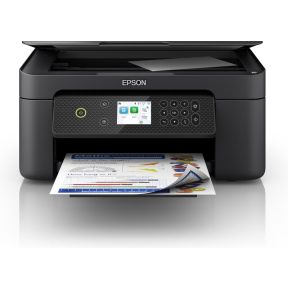
Epson Expression Home XP-4200
bij 2 winkels, goedkoopst bij Megekko
€79,95

De strafste Black Friday deals van België!
De strafste Black Friday deals van België!
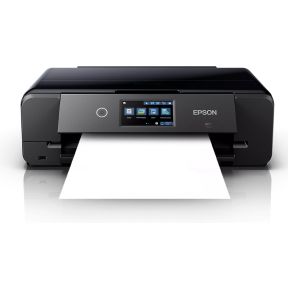
De laagste Black Friday-prijs voor de Epson Expression Photo XP-980 is € 269 (bij 2 winkels vergeleken).
Nu €269,00. Laat je adres achter en we mailen je zodra de prijs onder jouw bedrag zakt.
Je krijgt eerst een mail om te bevestigen — pas daarna staat de alert aan. Daarna hoogstens één bericht per week, en in elke mail staat een afmeldlink. Vink je de nieuwsbrief niet aan, dan gebruiken we je adres uitsluitend voor dit ene product. De nieuwsbrief is een aparte inschrijving die je los kan opzeggen.
We volgen de prijs van dit product sinds 1 dag. Zodra we twee weken aan metingen hebben, verschijnt hier de prijsgrafiek.
Met de Epson Expression Photo XP-980 all-in-one printer print, kopieer of scan je jouw foto's. Door de 6 aparte kleurencartridges en afdrukresolutie van 4.800 dpi zijn je foto's nog kleurrijker en scherper. Je kiest gemakkelijk de foto's die je wilt printen via het ingebouwde kleurentouchscreen. Je bewaart fotopapier en standaard papier gescheiden in 2 papierladen. De printer kiest automatisch het juiste papier. Ook grotere en dikkere vellen bedrukken is met de Expression Photo XP-980 geen probleem. Je print namelijk op papier tot A3 formaat. Door de flatbed scanner blijven je foto's tijdens het scannen op zijn plek liggen. Let op: wil je een foto afdrukken op fotopapier? Leg de achterkant (met het logo) naar boven in de printer.
Productinformatie aangeleverd door Coolblue.
De printsnelheid in zwart-witte A4-pagina's per minuut (ppm), normale kwaliteit. De werkelijke snelheid is mede afhankelijk van de systeemconfiguratie, de gebruikte software en het document.
De maximale resolutie in beeldpunten (dots) per inch (DPI).
Feature of computer printers and multifunction printers (MFPs) that allows the printing of a sheet of paper on both sides (automatically or manually)
Producing a paper copy of information stored on a computer.
Geeft aan welke methode dit product gebruikt om te printen.
Description of copying function (colour or monochrome).
To convert a document or picture into digital form for storage or processing on a computer
The total count of available paper input trays, including the main cassette and any optional or multipurpose trays (e.g. 2).
The maximum paper size the device can handle, defined by ISO A-series.
Een aansluiting voor een netwerkkabel. Een kabel is altijd stabieler dan wifi — handig voor een tv die vaak stokt bij streaming.
Kan het toestel zelf op je draadloos netwerk? Nodig voor apps, updates en streaming zonder kabel.
Under which category can the device be positioned in the market, e.g. camera phone.
De kleur (bvb. rood)
| Printen zonder witranden Indicates whether this product is capable of printing borderless photos, and what size | Ja |
|---|---|
| DVD's/CD's bedrukken Indicates whether the device supports direct printing of images or text onto DVD or CD discs. | Ja |
| Printsnelheid (kleur, standaard, A4/US Letter) The number of colour outputs produced per minute at normal quality for A4 or US Letter sizes, measured in ppm. | 28 ppm |
| Printsnelheid (zwart, standaardkwaliteit, A4/US Letter) De printsnelheid in zwart-witte A4-pagina's per minuut (ppm), normale kwaliteit. De werkelijke snelheid is mede afhankelijk van de systeemconfiguratie, de gebruikte software en het document. | 28 ppm |
| Maximale resolutie De maximale resolutie in beeldpunten (dots) per inch (DPI). | 5760 x 1440 DPI |
| Duplex printen Feature of computer printers and multifunction printers (MFPs) that allows the printing of a sheet of paper on both sides (automatically or manually) | Ja |
| Printen Producing a paper copy of information stored on a computer. | Afdrukken in kleur |
| Printtechnologie Geeft aan welke methode dit product gebruikt om te printen. | Inkjet |
| Modus voor dubbelzijdig afdrukken Specifies how the device handles double-sided printing, such as automatically flipping the page or requiring the user to do so manually. | Auto |
| Kopiëren Description of copying function (colour or monochrome). | Kopiëren in kleur |
|---|---|
| Dubbelzijdig kopiëren Indicates whether the device supports automatic double-sided copying. | Ja |
| Scan naar Specifies the available destinations where scanned documents can be sent, such as a cloud service, e-mail address, or network folder (e.g., FTP or CIFS). | Cloud |
|---|---|
| Scantechnologie Indicates the technology used to scan by this product | CIS |
| Optische scanresolutie How many pixels a scanner can see. Most commonly | 1200 x 4800 DPI |
| Scannen To convert a document or picture into digital form for storage or processing on a computer | Scannen in kleur |
| Printkleuren The colours that can be produced by the printer. | Zwart, Cyaan, Lichtyaan, Lichtmagenta, Magenta, Geel |
|---|---|
| Duplex functies The product has the ability to print | Printen |
| Multifunctionele lade, mediatypen Specifies the various types of paper and media formats that can be loaded into the multi-purpose tray (e.g. Envelopes or Glossy paper). | Enveloppen, Glanzend papier, Legal, Letter, Normaal papier |
|---|---|
| Foto papier afmetingen The dimensions of the photographic paper that the device is compatible with, measured in cm. | 10x15 cm, 13x18 cm |
| Afmetingen enveloppen The supported dimensions of envelopes that can be processed by the device (e.g. C4, C5 or B5). | 10, C6, DL |
| Non-ISO print papierafmetingen The specific paper dimensions supported by the device that do not follow the International Organization for Standardization (ISO) standards (e.g., Executive or Folio). | Legal, Letter |
| ISO B-series afmetingen (B0...B9) The supported paper dimensions based on the ISO 216 B-series standard (e.g. B0, B1, B2). | B5 |
| ISO A-series afmetingen (A0...A9) Different sizes of paper from A0 (big) to A9 (small). A4 is the most common size used for printing documents. | A3, A4, A5, A6 |
| Papierlade mediatypen Specifies the different kinds of materials that can be loaded into the paper tray, such as envelopes, card stock, or coated paper. | Enveloppen, Glanzend papier, Fotopapier, Normaal papier |
| Maximale ISO A-series papierformaat The maximum paper size the device can handle, defined by ISO A-series. | A3 |
| Type invoer papier The method or mechanism used to load media into the device (e.g., Cassette, Roll, or Manual). | Papierlade |
|---|---|
| Totaal aantal invoerladen The total count of available paper input trays, including the main cassette and any optional or multipurpose trays (e.g. 2). | 2 |
| USB-poort The device features a socket into which a USB cable can be plugged. | Ja |
|---|---|
| Direct printen Met deze functie kunt u foto’s en overige documenten rechtstreeks van uw compatible apparatuur naar een printer sturen, zonder tussenkomst van een pc. | Ja |
| Mobiele printing technologieën Apps etc. which allow users to send a print job from a smartphone or tablet to a printer via a wireless network. | Apple AirPrint, Epson Connect, Epson Email Print, Epson Remote Print, Epson iPrint, Google Cloud Print |
|---|---|
| Ondersteunde beveiligingsalgoritmen Er zijn verschillende manieren om data te versleutelen voordat het verzonden wordt. Over het algemeen geld, hoe meer bits, hoe veiliger. | 64-bit WEP, 128-bit WEP, WPA-AES, WPA-PSK, WPA-TKIP |
| Netwerkaansluiting Een aansluiting voor een netwerkkabel. Een kabel is altijd stabieler dan wifi — handig voor een tv die vaak stokt bij streaming. | Ja |
| Wifi Kan het toestel zelf op je draadloos netwerk? Nodig voor apps, updates en streaming zonder kabel. | Ja |
| Compatibele geheugenkaarten Types of memory cards which can be used with this product. | SD |
|---|---|
| Geïntegreerde geheugenkaartlezer Het apparaat bevat een ingebouwde geheugenkaartlezer (card reader). | Ja |
| Aanraakscherm Kan je het scherm bedienen door erop te tikken? Handig om te tekenen of te schrijven, maar het kost wat batterij en het scherm weerspiegelt doorgaans meer. | Ja |
|---|---|
| Kleurenscherm Indicates whether the device is equipped with a screen capable of displaying multiple colours. | Ja |
| Bediening Hoe je het toestel instelt: met knoppen, met een draaiknop, via een aanraakscherm of via een app. Knoppen werken ook met natte of vettige handen. | Touch |
| Schermdiagonaal De diagonaal van het scherm, van hoek tot hoek, meestal in inch (1 inch = 2,54 cm). Vuistregel voor een tv: meet de afstand van je zetel tot het scherm in centimeter en deel door 4 à 5. Op drie meter zit je zo rond 65 inch. | 10,9 cm (4.3") |
| Beeldscherm De gebruikte beeldschermtechnologie. Flat screen technologies zoals Liquid Cristal Display (LCD) en Thin Film Transistor (TFT) technologie zijn de trend. | LCD |
| Scherm aanwezig Heeft het toestel zelf een schermpje, bijvoorbeeld om de stand of het programma af te lezen? | Ja |
| Markt positionering Under which category can the device be positioned in the market, e.g. camera phone. | Thuis & kantoor |
| Kleur De kleur (bvb. rood) | Zwart |
| Gemiddeld stroomverbruik tijdens Kopiëren The amount of electrical energy used by the device during the copying process, measured in watts. | 17 W |
|---|---|
| Netfrequentie De frequentie van het stopcontact, in hertz. In Europa 50 Hz. Enkel van belang bij gebruik buiten Europa. | 50/60 Hz |
| Netspanning De spanning waarop het toestel werkt. In België is dat 230 volt. Alleen van belang als je het toestel in het buitenland wil gebruiken. | 220 - 240 V |
| Slaapstand The amount of electrical energy consumed by the device when it is in sleep mode, typically measured in watts (W). | 1,2 W |
| Ondersteunt Mac-besturingssysteem Mac operating systems e.g. OS X can be used with the device. | Ja |
|---|---|
| Ondersteunt Windows Windows vesions wich can be used with the device. | Ja |
| Maximum scanformaat The maximum dimensions of a document that can be digitized in a single pass, measured in mm. | 216 x 297 mm |
|---|---|
| Software-cd Indicates whether the product is supplied with software on a compact disc. | Ja |
| PictBridge PictBridge is een industriestandaard uit 2003 van de Camera & Imaging Products Association (CIPA) voor het direct afdrukken van afbeeldingen. | Ja |
| Gewicht Het gewicht van het toestel zelf, zonder verpakking. Bij iets dat je draagt of in de hand houdt weegt elke honderd gram merkbaar door. | 8,5 kg |
|---|---|
| Hoogte De hoogte van het toestel. Let bij toestellen onder een werkblad ook op de verstelbare pootjes — die geven vaak een paar centimeter speling. | 148 mm |
| Diepte De diepte van het toestel, zonder de slangen en stekkers achteraan. Reken daar nog enkele centimeters bij op. | 356 mm |
| Breedte De breedte van het toestel. Bij inbouw en bij toestellen die in een nis moeten: meet je opening na en houd een centimeter speling voor de aansluitingen achteraan. | 479 mm |
| Inclusief netsnoer Indicates whether a power cable is supplied with the product. | Ja |
|---|---|
| Garantiekaart Indicates whether a physical warranty card is included with the product. | Ja |
| Gebruiksaanwijzing Indicates whether a user manual or instructional guide is included with the product. | Ja |
| Cartridge(s) meegeleverd Indicates whether the product is supplied with the necessary cartridges for immediate use. | Ja |
60 specificaties, aangeleverd door de fabrikant.
Vandaag is de Epson Expression Photo XP-980 het goedkoopst bij Megekko, voor € 269. We vergelijken de prijs bij 2 webshops en werken die meerdere keren per dag bij.
We zijn de prijs van de Epson Expression Photo XP-980 net beginnen volgen. Vandaag betaal je € 269; zodra we genoeg gemeten hebben, zie je hier of dat hoog of laag is voor dit product. Zet een prijsalert als je liever wacht tot hij zakt.
bij 2 winkels, goedkoopst bij Megekko

bij 2 winkels, goedkoopst bij Megekko