✓Laagste prijs ooitWij meten de prijs van dit product zelf. In de 45 dagen dat wij het volgen, stond de prijs nooit lager dan nu. Hoe wij dat controlerenSinds we deze prijs volgen (45 dagen) was hij nooit lager.
Dat is € 30 goedkoper dan de duurste winkel (€ 349).
Nu €319,00. Laat je adres achter en we mailen je zodra de prijs onder jouw bedrag zakt.
Je krijgt eerst een mail om te bevestigen — pas daarna staat de alert aan. Daarna hoogstens één bericht per week, en in elke mail staat een afmeldlink. Vink je de nieuwsbrief niet aan, dan gebruiken we je adres uitsluitend voor dit ene product. De nieuwsbrief is een aparte inschrijving die je los kan opzeggen.
Prijsverloop
Onze eigen metingen sinds 8 oktober 2026. De laagste prijs die wij in die periode zagen: €319,00.
MinimumGemiddelde van alle winkelsLaagste prijs in de getoonde periode
Periode
Wijs een dag aan voor de cijfers, of sleep over de grafiek om in te zoomen.
Vandaag op de laagste prijs die wij ooit gemeten hebben
Cijfers achter de grafiek
Per maand: de laagste prijs die wij zagen, de gemiddelde prijs over alle winkels, en de hoogste prijs bij één winkel.
Maand
Laagste
Gemiddeld
Hoogste
oktober 2026
€ 349,00
€ 349,00
€ 349,00
november 2026
€ 319,00
€ 346,10
€ 349,00
Plus- en minpunten
laagste prijs ooit sinds wij deze prijs volgen
Afgeleid uit de specificaties hieronder en uit onze eigen prijsmetingen — geen mening, wel wat de cijfers betekenen.
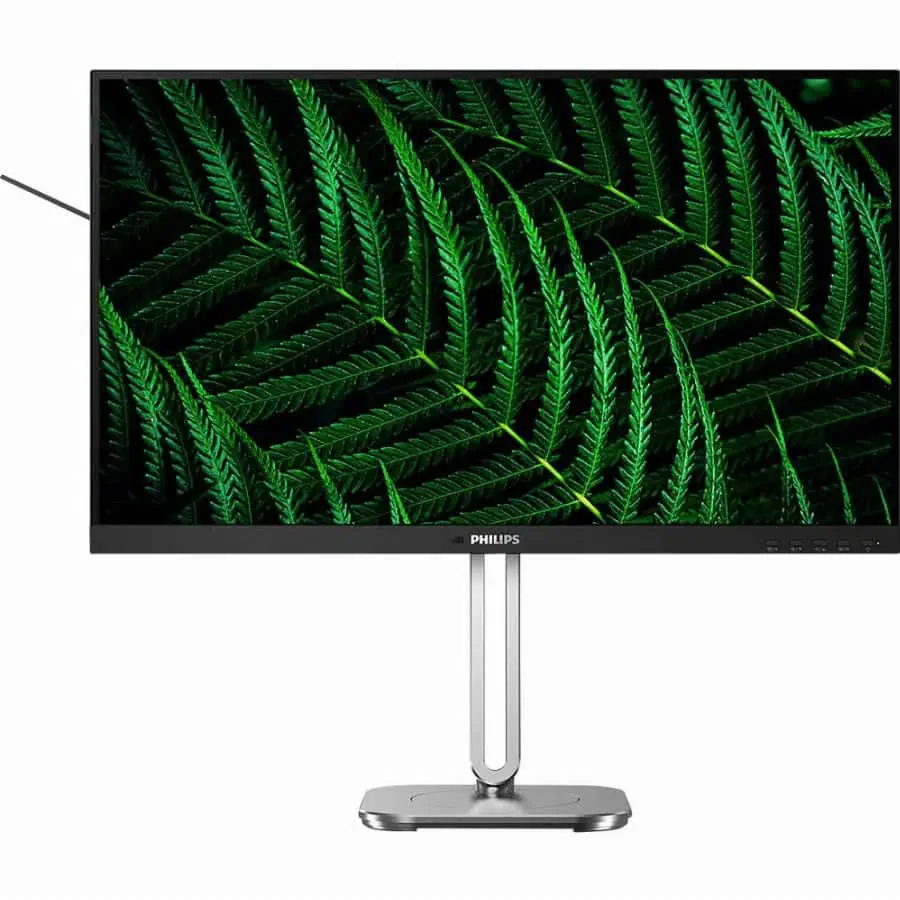
Over de Philips 3000 series 34B2U3600C/00 Curved
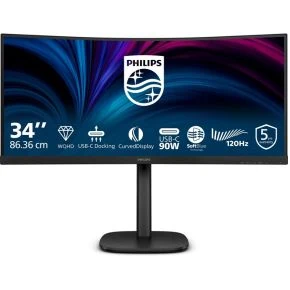
Philips 34B2U3600C/00 – De slimme USB-C-dockingmonitor voor een opgeruimde werkplek De Philips 34B2U3600C/00 is dé monitor voor wie eenvoud, overzicht en productiviteit wil combineren. Dit 34-inch ultrawide WQHD-scherm (3440 × 1440) biedt niet alleen haarscherpe beeldkwaliteit, maar verandert dankzij de geïntegreerde USB-C-dockingfunctie je hele werkplek in één elegante, efficiënte hub. Met één enkele kabel verbind je je laptop – voor video, data, internet én voeding tot 90 W Power Delivery. Geen losse adapters, geen kabelwirwar: sluit aan, laad op en start direct met werken. Perfect voor wie met een MacBook, ultrabook of hybride laptop werkt en de kracht van één kabel wil benutten. Eén kabel voor alles – het gemak van USB-C-docking De geïntegreerde USB-C-dock is het kloppende hart van deze Philips-monitor. Via één kabel verbind je je laptop met het scherm, je netwerk en je randapparatuur. De USB-C-poort levert tot 90 W voeding, zodat je laptop altijd wordt opgeladen terwijl je werkt. Bovendien loopt alle data via diezelfde verbinding – ideaal voor snel schakelen met externe SSD’s of randapparatuur. En dankzij de RJ-45-netwerkpoort heb je een stabiele bekabelde verbinding, ook als je wifi minder betrouwbaar is. Zo werkt de 34B2U3600C/00 niet alleen als monitor, maar als volwaardig dockingstation dat je bureau transformeert in een opgeruimde, productieve werkplek.
Productinformatie aangeleverd door Bol.com.
Belangrijkste kenmerken
Aanraakscherm ?
Kan je het scherm bedienen door erop te tikken? Handig om te tekenen of te schrijven, maar het kost wat batterij en het scherm weerspiegelt doorgaans meer.
Nee
Schermtechnologie ?
LED / LCD — een verlicht paneel. Betaalbaar en helder.
QLED — feller en kleurrijker, maar zwart blijft donkergrijs.
OLED — elke beeldpunt kan volledig uit, dus écht zwart en het beste contrast.
LCD
Beeldverhouding ?
De verhouding tussen breedte en hoogte van het scherm. 16:9 is de norm voor tv en film. Bredere verhoudingen tonen bioscoopfilms zonder balken, maar geven bij gewone tv wél balken links en rechts.
21:9
Resolutie ?
Het aantal beeldpunten van het scherm. Meer beeldpunten betekent een scherper beeld — vooral als het scherm groot is of je er dicht bij zit.
Full HD (1920×1080) — prima tot ongeveer 43 inch.
4K / Ultra HD (3840×2160) — vier keer zoveel beeldpunten als Full HD. Vandaag de standaard vanaf 50 inch.
8K (7680×4320) — nog eens vier keer zoveel, maar er bestaat nauwelijks materiaal in 8K. Je betaalt vooral voor de toekomst.
3440 x 1440 Pixels
Schermdiagonaal ?
De diagonaal van het scherm, van hoek tot hoek, meestal in inch (1 inch = 2,54 cm).
Vuistregel voor een tv: meet de afstand van je zetel tot het scherm in centimeter en deel door 4 à 5. Op drie meter zit je zo rond 65 inch.
86,4 cm (34")
Ingebouwde camera ?
Het product heeft een ingebouwde camera.
Nee
Ingebouwde luidsprekers ?
The device contains speaker(s) to produce sound.
Ja
Kleur ?
De kleur (bvb. rood)
Zwart
Markt positionering ?
Under which category can the device be positioned in the market, e.g. camera phone.
Bedrijf
Ingebouwde USB-hub ?
Whether or not the device features a USB hub to connect more than one other device via USB.
Ja
Muurbeugel (VESA) ?
Het gatenpatroon achteraan, in millimeter — bijvoorbeeld 400×300. Een muurbeugel past alleen als hij dezelfde maat aankan.
The diagonal length of the screen area, typically measured in inches (e.g. 24 inch).
34 inch / 86.36 cm
sRGB ?
Indicates whether the device supports the sRGB color space standard for consistent color reproduction.
Ja
NTSC-dekking (normaal) ?
The percentage of the NTSC color gamut that the device is capable of reproducing.
104 procent
sRGB-dekking (gemiddeld) ?
The percentage of the sRGB color space that the device is capable of reproducing.
120 procent
Kleurstandaard gamut ?
The specific color space standard the device is designed to reproduce, such as Adobe RGB or DCI-P3.
sRGB, NTSC
Kleurdiepte ?
The number of bits used to represent the colour of a single pixel, which determines the total number of possible colours that can be displayed.
10 Bit
Hardheid oppervlak ?
The resistance of the surface to scratches and abrasion, typically measured on the Mohs or pencil hardness scale (e.g., 9H).
3H
Waasniveau ?
The percentage of transmitted light that is scattered by the material, indicating the level of cloudiness or translucency.
25 procent
DDC/CI ?
Indicates whether the product supports the Display Data Channel Command Interface for controlling device settings via software.
Ja
Schermdiameter in centimeters ?
This is the size of the display screen
86,36 cm
Digitale verticale frequentie ?
The range of refresh rates the device can support when operating in digital mode, measured in Hertz (Hz).
48 - 120 Hz
Digitale horizontale frequentie ?
The range of horizontal scanning frequencies the device can support, measured in kHz.
30 - 190 kHz
Grootte beeld (verticaal) ?
De grootte van het daadwerkelijke beeld is vaak kleiner dan de grootte van de monitor, omdat er soms een grote rand om het beeld zit.
33,4 cm
Grootte beeld (horizontaal) ?
De grootte van het daadwerkelijke beeld is vaak kleiner dan de grootte van de monitor, omdat er soms een rand om het beeld zit.
79,7 cm
Frequentiebereik verticaal ?
Frequentiebereik verticaal: ook wel refresh rate genoemd. Het aantal keer per seconde dat een beeld compleet opnieuw wordt opgebouwd.
48 - 100 Hz
Pixeldichtheid ?
The number of individual pixels displayed per inch of linear screen space, measured in pixels per inch (ppi).
110 ppi
Pixel pitch ?
Afstand tussen twee "beeldpunten". Hoe dichter de beeldpunten bij elkaar staan hoe scherper het beeld over het algemeen zal zijn.
0,23175 x 0,23175 mm
Beeldscherm, aantal kleuren ?
Het aantal kleuren dat een scherm kan weergeven. Meer kleuren zorgen voor vloeiendere kleurovergangen en een realistischer beeld, vooral bij foto’s, films en games.
Een scherm met 16,7 miljoen kleuren (8-bit) is de standaard en voor de meeste toepassingen ruim voldoende. 1 miljard kleuren (10-bit) kan zichtbaar betere kleurovergangen geven bij HDR-video en professionele foto- of videobewerking.
1,07 miljard kleuren
Kijkhoek, verticaal ?
Maximum vertical angle at which a display can be viewed with acceptable visual performance.
178°
Kijkhoek, horizontaal ?
Maximum horizontal angle at which a display can be viewed with acceptable visual performance.
178°
Beeldfrequentie (max.) ?
De hoogste beeldfrequentie die het scherm haalt, in hertz. 60 Hz is genoeg voor film en tv; 120 Hz of meer is vooral merkbaar bij games en sport.
120 Hz
Marketingnaam dynamische contrastratio ?
The proprietary brand name used by the manufacturer to describe the technology that automatically adjusts the backlight to improve the contrast ratio (e.g., ASUS Smart Contrast Ratio).
SmartContrast
Contrast ratio (dynamisch) ?
A property of a display system
50000000:1
Typische contrastverhouding ?
De verhouding tussen de hoeveelheid licht van het helderste wit en het donkerste zwart van de display/projector.
3500:1
Ondersteunde grafische resoluties ?
The graphic resolutions that can be displayed by the device. The graphic resolution describes the width and height dimensions of a display
3440 x 1440
Schermkrommingsclassificatie ?
The radius of the curve of the screen, expressed in millimetres (e.g. 1500R), where a smaller number indicates a more pronounced curve.
1500R
Schermvorm ?
Vlak of gebogen. Een gebogen scherm oogt indrukwekkend van dichtbij en alleen recht ervoor; zit je er met meerdere mensen naast, dan werkt vlak beter.
Gebogen
Antireflectiescherm ?
Hiermee beschik je zelfs in direct zonlicht altijd over optimaal beeld.
Ja
Type reactietijdmeting ?
The method used to measure the time it takes for a pixel to change colors, such as GTG (Gray to Gray) or BwB (Black-white-Black).
GTG (Gray to Gray)
Responstijd ?
De responstijd is het tijdsverschil tussen het moment dat de grafische kaart een beeld verstuurt naar de monitor en het moment dat de monitor dat beeld weergeeft. Gewoonlijk moet deze tijd zeker onder de 25ms liggen.
4 ms
Helderheid (typisch) ?
Display brightness, measured by its Luminance, presented as a figure in nits. Typical brightness ratings for monitors range from 250 to 350 nits with a target value of between 80 to 120 nits being suitable for most displays in a normal viewing environment.
300 cd/m²
Aanraakscherm ?
Kan je het scherm bedienen door erop te tikken? Handig om te tekenen of te schrijven, maar het kost wat batterij en het scherm weerspiegelt doorgaans meer.
Nee
Backlight type ?
The technology used to illuminate the display panel, such as CCFL or various LED configurations (e.g., Edge LED, Full-Array).
W-LED
LED backlight ?
A backlight is a form of illumination used in liquid crystal displays (LCDs). One type of backlight is made by LEDs
Ja
Soort paneel ?
The technology used to manufacture the panel, such as AMOLED or AH-IPS.
VA
Schermtechnologie ?
LED / LCD — een verlicht paneel. Betaalbaar en helder.
QLED — feller en kleurrijker, maar zwart blijft donkergrijs.
OLED — elke beeldpunt kan volledig uit, dus écht zwart en het beste contrast.
LCD
Beeldverhouding ?
De verhouding tussen breedte en hoogte van het scherm. 16:9 is de norm voor tv en film. Bredere verhoudingen tonen bioscoopfilms zonder balken, maar geven bij gewone tv wél balken links en rechts.
21:9
Beeldkwaliteit ?
Hoe scherp het beeld is, in de benaming die fabrikanten gebruiken.
Full HD — 1920×1080 beeldpunten.
4K Ultra HD — vier keer zoveel als Full HD. De gangbare keuze vanaf 50 inch.
8K Ultra HD — nog eens vier keer zoveel. Er is voorlopig bijna geen film of serie in 8K te vinden.
Wide Quad HD
Resolutie ?
Het aantal beeldpunten van het scherm. Meer beeldpunten betekent een scherper beeld — vooral als het scherm groot is of je er dicht bij zit.
Full HD (1920×1080) — prima tot ongeveer 43 inch.
4K / Ultra HD (3840×2160) — vier keer zoveel beeldpunten als Full HD. Vandaag de standaard vanaf 50 inch.
8K (7680×4320) — nog eens vier keer zoveel, maar er bestaat nauwelijks materiaal in 8K. Je betaalt vooral voor de toekomst.
3440 x 1440 Pixels
Schermdiagonaal ?
De diagonaal van het scherm, van hoek tot hoek, meestal in inch (1 inch = 2,54 cm).
Vuistregel voor een tv: meet de afstand van je zetel tot het scherm in centimeter en deel door 4 à 5. Op drie meter zit je zo rond 65 inch.
86,4 cm (34")
Prestatie
Ondersteunt Mac-besturingssysteem ?
Mac operating systems e.g. OS X can be used with the device.
Ja
Ondersteunt Windows ?
Windows vesions wich can be used with the device.
Windows 10, Windows 11
Laag-blauw-licht-technologie ?
Indicates whether the product features technology designed to reduce the amount of harmful short-wave blue light emitted by the screen to decrease eye strain.
Ja
Knippervrije technologie ?
Indicates whether the device employs technology to reduce or eliminate screen flickering to decrease eye strain during prolonged use.
Ja
Component video sync ?
The method used to synchronize the video signal, such as Sync-on-green (SOG) or Composite sync.
Gescheiden synchronisatie, Sync-on-green (SOG)
VESA Adaptive Sync-ondersteuning ?
Indicates whether the device supports the VESA Adaptive-Sync standard to synchronize the refresh rate with the GPU to reduce screen tearing.
Ja
Multimedia
Ingebouwde camera ?
Het product heeft een ingebouwde camera.
Nee
Ingebouwde luidsprekers ?
The device contains speaker(s) to produce sound.
Ja
Stroomverbruik (gemiddeld) ?
Het verbruik bij normaal gebruik, in watt. Dit cijfer benadert je energiefactuur beter dan het maximum.
10 W
Aantal luidsprekers ?
Het aantal luidsprekers dat in het product is ingebouwd of wordt meegeleverd. Meer luidsprekers kunnen een voller of ruimtelijker geluid geven, maar de geluidskwaliteit hangt ook af van hun formaat, vermogen en plaatsing.
2
Design
Voetenkleur ?
The colour of the feet
Zwart
Rand voorzijde ?
The colour of the frame surrounding the front of the display (e.g. Black, Silver).
Zwart
Kleur ?
De kleur (bvb. rood)
Zwart
Markt positionering ?
Under which category can the device be positioned in the market, e.g. camera phone.
Bedrijf
Poorten & interfaces
HDCP versie ?
The version of the High-bandwidth Digital Content Protection standard supported by the device to prevent the unauthorized copying of digital audio and video content (e.g. 2.2).
2.2
HDCP ?
High-bandwidth Digital Content Protection (HDCP) is een versleuteling van digitale audio- en videoinhoud die verstuurd wordt over DVI- of HDMI-verbindingen. Het is een vorm van digitaal rechtenbeheer (DRM) om het illegaal kopiëren van data tegen te gaan. Data wordt uitsluitend doorgegeven aan randapparatuur die daartoe gerechtigd is en daartoe een uniek HDCP-nummer heeft.
Ja
Ingebouwde KVM schakelaar ?
Indicates whether the product includes an integrated keyboard, video, and mouse switch to control multiple computers with a single set of peripherals.
Ja
Audio-uitgang ?
The type of audio output that the device produces
Ja
DisplayPort versie ?
The specific release version of the DisplayPort standard supported by the device (e.g., 1.2 or 1.4).
1.4
Aantal DisplayPorts ?
Number of DisplayPorts. A DisplayPort is a digital display interface developed by the Video Electronics Standards Association (VESA). The interface is primarily used to connect a video source to a display device such as a computer monitor
1
HDMI versie ?
The specific release version of the High-Definition Multimedia Interface standard supported by the device (e.g. 1.3 or 2.0).
2.0
HDMI-aansluitingen ?
Hoeveel toestellen je tegelijk kan aansluiten: decoder, spelconsole, soundbar, mediaspeler. Reken op één per toestel — een extra poort is achteraf niet bij te bouwen.
1
HDMI ?
HDMI (High-Definition Multimedia Interface) is a compact audio/video interface for transferring uncompressed video data and compressed/uncompressed digital audio data from a HDMI-compliant device ("the source device") to a compatible computer monitor
Ja
USB Power Delivery tot max. ?
The maximum amount of power the device can provide or receive via a USB connection, measured in watts.
90 W
USB-snelladen ?
Een afspraak waarmee toestellen en laders onderling regelen hoeveel stroom er mag vloeien. Met een PD-lader laadt het toestel merkbaar sneller — ook als de lader van een ander merk is.
Ja
USB Type-C DisplayPort alternatieve modus ?
Indicates whether the USB Type-C port supports the transmission of native DisplayPort video signals to an external display.
Ja
Aantal USB Type-A downstream-poorten ?
The number of USB Type-A ports available for connecting peripheral devices to the unit.
4
Aantal USB Type-C-upstreampoorten ?
The total number of USB Type-C ports available to connect the device to a host computer or source.
1
Aantal USB Type-B-upstreampoorten ?
The total number of USB Type-B ports available to connect the device to a host computer for data transmission.
1
Aantal upstream-poorten ?
The total number of available ports used to connect the device to a computer or another network source.
2
Type USB-upstreampoort ?
The connector type used for the upstream connection to a host device (e.g., USB Type-B or USB Type-C).
USB Type-B, USB Type-C
Versie USB-hub ?
The technical standard of the USB hub, if available, which determines the maximum data transfer speed (e.g., 3.2 Gen 1).
3.2 Gen 1 (3.1 Gen 1)
Ingebouwde USB-hub ?
Whether or not the device features a USB hub to connect more than one other device via USB.
Ja
Ergonomie
On Screen Display (OSD)-talen ?
The list of available languages for the device's display interface (e.g., AFR for Afrikaans, ARA for Arabic).
Indicates whether the device can display a graphical menu or information directly on the screen for adjusting settings and viewing status.
Ja
Bereik kantelhoek ?
The minimum and maximum angles at which the unit can be tilted, typically expressed in degrees.
-5 - 30°
kantel aanpassingen ?
The tilt
Ja
Horizontaal draaibaar
-180 - 180°
Draaibaar ?
Indicates whether the product has a mechanism that allows it to rotate horizontally.
Ja
Verstelbare hoogte (max) ?
The maximum distance the unit can be raised vertically from its lowest position, measured in millimetres.
18 cm
In hoogte verstelbaar ?
The part of the device that can be adjusted to change the height.
Ja
Kabelslot sleuf type ?
The standard of the security slot used to attach a physical locking cable to the device (e.g. Kensington or Noble).
Kensington
Bevestigingsmogelijkheid voor kabelslot ?
Holes on the edge of devices through which a cable lock can be passed
Ja
Paneelmontage-interface ?
Het product heeft een VESA-montagepatroon: vier schroefgaten op de achterkant volgens een vaste standaard. Daardoor past het op een compatibele muurbeugel, monitorarm of tv-standaard. Controleer wel de VESA-maat, bijvoorbeeld 100 × 100 mm of 200 × 200 mm.
100 x 100 mm
Muurbeugel (VESA) ?
Het gatenpatroon achteraan, in millimeter — bijvoorbeeld 400×300. Een muurbeugel past alleen als hij dezelfde maat aankan.
Ja
LED-indicatoren ?
The specific status lights available on the unit to provide visual feedback on its current state or connectivity (e.g., AC input, ACT, or Access).
Ja
Picture-in-Picture ?
Picture-in-picture (PiP) is a feature of some television receivers and similar devices. One program (channel) is displayed on the full TV screen at the same time as one or more other programs are displayed in inset windows. Sound is usually from the main program only.
Ja
Netwerk
Netwerkaansluiting ?
Een aansluiting voor een netwerkkabel. Een kabel is altijd stabieler dan wifi — handig voor een tv die vaak stokt bij streaming.
Ja
Energie
Energielabel-schaal ?
Volgens welke versie van het label de klasse bepaald is. Sinds 2021 loopt de schaal van A tot G; oudere labels met A+ tot A+++ zijn daar niet mee te vergelijken.
A tot G
Soort voeding ?
De voeding voorziet uw computer van stroom. Deze kan intern of extern zijn. PFC = Power Factor Correctie. CE = CE merk compatibel. Wanneer er twee waarden (Watt) worden aangegeven, betreft het vaak low line versus high line-condities. Meerdere voedingen worden voor redundantie ingezet. Wanneer een extra voeding optioneel is wordt dat aangegeven door het maximum aantal te noemen. Voeding kunnen Hot Plug of niet-Hot Plug zijn.
Intern
Netfrequentie ?
De frequentie van het stopcontact, in hertz. In Europa 50 Hz. Enkel van belang bij gebruik buiten Europa.
50/60 Hz
Netspanning ?
De spanning waarop het toestel werkt. In België is dat 230 volt. Alleen van belang als je het toestel in het buitenland wil gebruiken.
100 - 240 V
Stroomverbruik (PowerSave) ?
The amount of electrical energy consumed by the device when it is operating in a power-saving mode, measured in Watts.
20,2 W
Stroomverbruik (indien uit) ?
The amount of electrical energy consumed by the device when it is switched off, measured in watts.
0 W
Verbruik in stand-by ?
Wat het toestel verbruikt terwijl het uit lijkt te staan. Klein per uur, maar het loopt het hele jaar door — en het telt mee in je factuur.
0,3 W
Stroomverbruik (typisch) ?
Het vermogen van het apparaat, uitgedrukt in Watts. Typische waardes die fabrikanten geven zijn stroomverbruik indien uitgeschakeld, standby/suspended, typisch gebruik, maximaal gebruik.
28,19 W
Energieverbruik (SDR) per 1000 uur ?
The amount of electric energy consumed by the device during standard dynamic range (SDR) operation over a period of 1000 hours, measured in kilowatt-hours (kWh).
20 kWu
Energieklasse (gewoon beeld) ?
Het energielabel bij gewoon beeld. Bij HDR-beeld ligt het verbruik hoger, en daar geldt een aparte klasse voor.
D
Eisen aan de omgeving
Hoogte bij opslag ?
The maximum and minimum altitude at which the unit can be stored or transported without sustaining damage, measured in metres.
0 - 12192 m
Hoogte, in bedrijf ?
The maximum and minimum height above sea level at which the device can function correctly, measured in m.
0 - 3658 m
Relatieve vochtigheid in bedrijf (V-V) ?
Relatieve Luchtvochtigheid is de hoeveelheid waterdamp die de lucht bevat in verhouding (in procenten) tot de hoeveelheid water die de lucht bij die temperatuur maximaal zou kunnen bevatten (100%), koude lucht kan bijvoorbeeld minder water bevatten dan warme. Als de lucht afkoelt en de relatieve luchtvochtigheid daardoor boven de 100% komt, condenseert de waterdamp en krijgt men water.
20 - 80 procent
Temperatuur bij opslag ?
The minimum and maximum temperatures at which the product can be safely stored.
-20 - 60 °C
Bedrijfstemperatuur (T-T) ?
The minimum and maximum temperatures at which the product can be safely operated.
0 - 40 °C
Gewicht en omvang
Gewicht (zonder voet) ?
The mass of the device excluding the support base, measured in g.
7,82 kg
Hoogte (zonder voet ) ?
The vertical measurement of the device when the stand is removed, measured in mm.
369 mm
Diepte zonder voet ?
Hoe ver het scherm uitsteekt zonder voet. Aan de muur komt daar nog de dikte van de beugel bij.
107 mm
Breedte zonder voet ?
De breedte van het scherm alleen — de maat die telt als je het aan de muur hangt.
807 mm
Gewicht (met standaard) ?
The total mass of the unit including its supporting base, measured in kilograms or grams.
10,4 kg
Hoogte apparaat (met standaard) ?
The total vertical measurement of the product including its base or support structure, expressed in millimetres or centimetres.
602 mm
Diepte met voet ?
Hoe diep het toestel met voet is. Meet je tv-meubel na: een voet die uitsteekt staat wankel.
287 mm
Breedte met voet ?
De breedte inclusief de voet. Dit is de maat die je meubel moet kunnen dragen.
807 mm
Inhoud van de verpakking
Handleiding ?
Zit er een handleiding bij, op papier of digitaal?
Ja
Kabels in de doos ?
Welke kabels erbij zitten. Ontbreekt de kabel die jij nodig hebt, reken er dan een aparte aankoop bij.
DisplayPort, HDMI, Stroom, USB Type-C naar USB Type-C
Staander inbegrepen ?
Indicates whether a support stand is supplied with the product.
Ja
Meegeleverde software ?
Software distributed with another product such as a piece of computer hardware or other electronic device
SmartControl
Duurzaamheid
Duurzaamheidscertificaten ?
The environmental or ethical certifications the product has received to verify its sustainability standards (e.g., ASC or ACT Organic).
ENERGY STAR
Bevat geen ?
Specifies the harmful or restricted substances that are not present in the product (e.g. Acetone, Alcohol, or Aluminium).
Kwik, PVC/BFR
Overige specificaties
Gebruikersknoppen ?
The available physical or digital interfaces used to adjust settings and operate the device.
SmartImage, Input, User, Menu, Power On/Off
Monitor sync inputsignaal ?
The specific signal format or standard used to synchronize the display's refresh rate with the incoming video source to prevent screen tearing.
Separate Sync, Sync on Green
Beeldverbetering ?
Specifies the technologies or software algorithms used to improve visual quality, such as noise reduction or contrast optimization.
SmartImage
Officiële goedkeuringen ?
Lists the official certifications and compliance standards the product has met for legal sale and operation in various regions.
Indicates whether the device features a low blue light mode to reduce eye strain during prolonged use.
Ja
EasyRead-modus ?
Indicates whether the device features a specialized display setting that reduces blue light emissions to provide a more paper-like reading experience.
Ja
Certificaten van naleving ?
Indicates which regulatory, safety, and environmental standards the product complies with, as verified by recognized authorities or certification bodies.
RoHS
Glanstype buitenzijde ?
The material or surface treatment applied to the outer casing of the unit (e.g. brushed steel, matt, or painted).
Getextureerd
Compatibele besturingssystemen ?
List of desktop operating systems tested as compatible with this product, including coined name and version
DDC/CI, Mac OS, sRGB, Windows 11 / 10
Aantal Ethernet LAN (RJ-45)-poorten ?
Het aantal Ethernetpoorten (RJ45) op het toestel. Via zo’n netwerkpoort sluit je met een netwerkkabel bijvoorbeeld een computer, router of modem aan voor een stabiele internetverbinding.
1
MultiView ?
Indicates the specific technology or mode that allows the screen to be divided into multiple sections to display content from different sources simultaneously.
2x devices, PIP/PBP mode
SmartImage ?
The proprietary image optimization technology used to enhance visual quality through predefined presets for different content types.
Y
Beeld naast beeld (PbP) ?
Indicates whether the screen can display content from two different input sources side-by-side simultaneously.
Ja
USB Power Delivery herziening ?
The version of the USB Power Delivery specification supported by the device (e.g. 3.0), which determines the power negotiation capabilities and maximum wattage.
3.0
Aan-uitknop ?
Het toestel heeft een echte schakelaar. Handig om het volledig uit te zetten in plaats van in stand-by te laten staan.
Ja
HBR3-ondersteuning ?
Indicates whether the product supports High Bit Rate 3 (HBR3), allowing for higher data transfer speeds and resolutions.
Ja
Recyclinginformatie
Verpakkingsrecycleerbaarheidsgraad ?
The percentage of the packaging's total weight that consists of materials which can be effectively recycled at end-of-life through established recycling processes.
100 procent
Product post-consumer gerecycled plastic ?
The percentage of post-consumer recycled plastic relative to the total weight of all plastic used in the product.
85 procent
Verpakking en logistiek 5
Gewicht verpakking
15,3 kg
Hoogte verpakking
525 mm
Diepte verpakking
188 mm
Breedte verpakking
930 mm
Export Control Classification Number (ECCN)
EAR99
140 specificaties, aangeleverd door de fabrikant.
Veelgestelde vragen
Waar kan ik de Philips 3000 series 34B2U3600C/00 Curved het goedkoopste kopen?
Vandaag is de Philips 3000 series 34B2U3600C/00 Curved het goedkoopst bij Joybuy.nl, voor € 319. We vergelijken de prijs bij 4 webshops en werken die meerdere keren per dag bij. Het verschil met de duurste winkel is € 30: daar betaal je € 349 voor hetzelfde product.
Is dit nu een goede prijs voor de Philips 3000 series 34B2U3600C/00 Curved?
De huidige prijs van € 319 is laagste prijs ooit. Sinds we deze prijs volgen (45 dagen) was hij nooit lager. We meten die prijzen zelf, meerdere keren per dag — het is dus niet de "van"-prijs die de winkel zelf opgeeft.
✓Laagste prijs ooitWij meten de prijs van dit product zelf. In de 45 dagen dat wij het volgen, stond de prijs nooit lager dan nu. Sinds we deze prijs volgen (45 dagen) was hij nooit lager.
✓Laagste prijs ooitWij meten de prijs van dit product zelf. In de 45 dagen dat wij het volgen, stond de prijs nooit lager dan nu. Sinds we deze prijs volgen (45 dagen) was hij nooit lager.
✓Laagste prijs ooitWij meten de prijs van dit product zelf. In de 45 dagen dat wij het volgen, stond de prijs nooit lager dan nu. Sinds we deze prijs volgen (45 dagen) was hij nooit lager.
✓Laagste prijs ooitWij meten de prijs van dit product zelf. In de 45 dagen dat wij het volgen, stond de prijs nooit lager dan nu. Sinds we deze prijs volgen (45 dagen) was hij nooit lager.