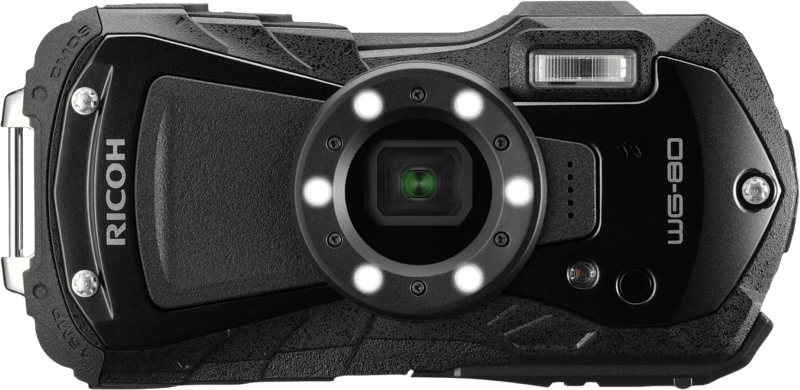
Ricoh WG-80 Zwart
bij 4 winkels, goedkoopst bij Coolblue
€299

De strafste Black Friday deals van België!
De strafste Black Friday deals van België!
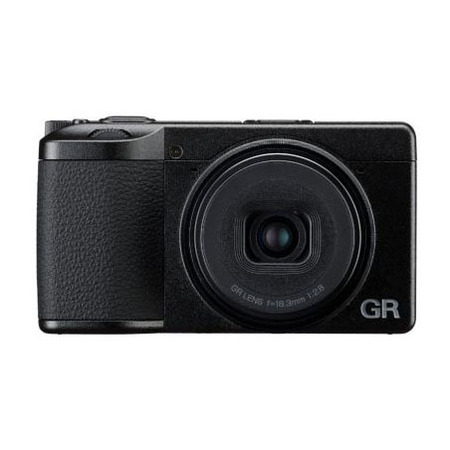
De laagste Black Friday-prijs voor de RICOH GR IV HDF BLACK is € 1.504,95 (bij 4 winkels vergeleken).
Dat is € 44,05 goedkoper dan de duurste winkel (€ 1.549).
Nu €1.504,95. Laat je adres achter en we mailen je zodra de prijs onder jouw bedrag zakt.
Je krijgt eerst een mail om te bevestigen — pas daarna staat de alert aan. Daarna hoogstens één bericht per week, en in elke mail staat een afmeldlink. Vink je de nieuwsbrief niet aan, dan gebruiken we je adres uitsluitend voor dit ene product. De nieuwsbrief is een aparte inschrijving die je los kan opzeggen.
We volgen de prijs van dit product sinds 1 dag. Zodra we twee weken aan metingen hebben, verschijnt hier de prijsgrafiek.
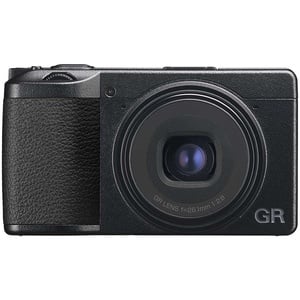
RICOH GR IV HDF
Om de essentiële waarden van de GR-serie verder te versterken, is de GR IV uitgerust met een aantal nieuw ontwikkelde sleutelcomponenten, inclusief de lens, beeldsensor en beeldverwerkingsprocessor. Het beschikt over een nieuw ontwikkelde APS-C-beeldsensor en een nieuw ontworpen lens om de beeldkwaliteit te verbeteren en tegelijkertijd de behuizing kleiner te maken – een concept van de GR-serie dat al werd toegepast in het vorige model, de RICOH GR III. Het nieuwe model, de GR IV HDF, beschikt over de belangrijkste voordelen van het basismodel, zoals een uitzonderlijke beeldkwaliteit, snelle reactietijd en mobiliteit, en is bovendien uitgerust met RICOH’s HDF (Highlight Diffusion Filter), waarmee gebruikers snel en eenvoudig vastleggen zachte, subtiele beelden met een subtiele hoogtepunten naast de heldere, scherpgestelde beelden waarvoor het basismodel bekend staat. Deze creatieve veelzijdigheid verlegt de grenzen van de visuele expressie in de momentopnamefotografie. HDF maakt het verschil
HDF-filter, een nieuwe visuele huisstijl
Exclusief bij de GR IV HDF: het Highlight Diffusion Filter (HDF) verandert het uiterlijk van uw foto’s in een oogwenk. Door de hoge lichten te verzachten en het opstellen van een subtiele, filmische uitstraling; dit filter biedt een expressief alternatief voor de traditionele ultrascherpe look, die met een simpele druk op de Fn-knop kan worden in- of uitgeschakeld.
Productinformatie aangeleverd door Bol.com.
Resolution is the amount of detail held by an image. The higher the resolution
A sensor is a convertor than measures a physical quality (light
MegaPixels: Het aantal (in millioenen) lichtgevoelige beeldpunten, of pixels, die gebruikt worden door de image sensor van de camera (CCD) om lichtopnames te maken, en die zijn weerslag vind in het uiteindelijk aantal opgeslagen pixels op een memory card (geheugenkaart).
Er zijn een aantal veel voorkomende typen digitale camera's: compactcamera's, bridge-camera's, mirrorless interchangeable-lens camera's (MILC) en single lens reflex (SLR) camera's. Bridge camera's 'overbruggen het gat' tussen eenvoudige compact camera's en professionele (SLR) camera's. Ook MILC's vormen een middensegment door de grotere sensoren en verwisselbare lensen van SLR's te combineren met de live-preview systemen van compactcamera's. "Kit" geeft aan dat een beginnerslens aanwezig is. "Body" geeft aan dat de camera zonder lens wordt aangeboden.
This is the maximum resolution of video images. Resolution is a measure of the degree of detail visible.
Recording moving visual images.
De gebruikte beeldschermtechnologie. Flat screen technologies zoals Liquid Cristal Display (LCD) en Thin Film Transistor (TFT) technologie zijn de trend.
De kleur (bvb. rood)
| Ondersteund beeldformaat The type of image files that the device can use/display e.g. gif | JPEG |
|---|---|
| Sensor formaat The physical size and standard of the image sensor, such as Full-frame or APS-C. | Advanced Photo System type-C (APS-C) |
| Gelijktijdige opname Indicates whether the device can record data to multiple storage media at the same time. | Ja |
| Type kleurenfilter The specific technology or method used for the colour filter, such as a primary colour filter. | Primaire kleurenfilter |
| Sensorverschuiving IS aantal stops (max) The maximum amount of image stabilization provided by the sensor-shift system, expressed as the number of exposure stops. | 6 |
| Aantal gecomprimeerde opties (JPEG) The total number of available image quality settings for JPEG compression, allowing the user to balance file size and image detail. | 4 |
| Grootte van de beeldsensor ( B x H ) The physical dimensions of the light-sensitive area of the image sensor, measured in mm. | 23,3 x 15,5 mm |
| Totaal aantal megapixels A megapixel (MP or Mpx) is one million pixels | 25,74 MP |
| Ondersteunde beeldverhoudingen The aspect ratio is the ratio of the width of an image to its height. The supported aspect ratios are the aspect ratios that can be shown by the device. | 3:2, 4:3, 1:1, 16:9 |
| Beeldstabilisator Een beeldstabilisator voorkomt dat het beeld vaag wordt als de camera beweegt. | Ja |
| Fotoresolutie(s) List of image resolutions that supported by device. | 6192 x 4128, 4944 x 3296, 3504 x 2336, 1920 x 1280; 4:3: 5504 x 4128, 4400 x 3296, 3120 x 2336, 1920 x 1440; 1:1: 4128 x 4128, 3296 x 3296, 2336 x 2336, 1280 x 1280; 16:9: 6192 x 3480, 4944 |
| Maximale beeldresolutie Resolution is the amount of detail held by an image. The higher the resolution | 6192 x 4128 Pixels |
| Sensorreinigingssysteem The technology used to remove dust and debris from the image sensor, such as through ultrasonic vibration (e.g., EOS integrated). | Ultrasone trilling |
| Type beeldsensor A sensor is a convertor than measures a physical quality (light | CMOS |
| Megapixels MegaPixels: Het aantal (in millioenen) lichtgevoelige beeldpunten, of pixels, die gebruikt worden door de image sensor van de camera (CCD) om lichtopnames te maken, en die zijn weerslag vind in het uiteindelijk aantal opgeslagen pixels op een memory card (geheugenkaart). | 25,74 MP |
| Cameratype Er zijn een aantal veel voorkomende typen digitale camera's: compactcamera's, bridge-camera's, mirrorless interchangeable-lens camera's (MILC) en single lens reflex (SLR) camera's. Bridge camera's 'overbruggen het gat' tussen eenvoudige compact camera's en professionele (SLR) camera's. Ook MILC's vormen een middensegment door de grotere sensoren en verwisselbare lensen van SLR's te combineren met de live-preview systemen van compactcamera's. "Kit" geeft aan dat een beginnerslens aanwezig is. "Body" geeft aan dat de camera zonder lens wordt aangeboden. | Compactcamera |
| Beeldsensorformaat The total dimensions of the sensor within the camera, given in inches (''). | 1/1.55" |
| Verhouding beeldsensor The proportional relationship between the width and the height of the image sensor. | 3:2 |
| Aantal diafragma bladen The total count of overlapping blades in the lens aperture that control the amount of light reaching the sensor and influence the shape of the bokeh. | 7 |
|---|---|
| Aantal aspheric elementen The total count of specially shaped lens elements designed to reduce spherical aberration and improve image sharpness. | 3 |
| Brandpuntsafstandvermenigvuldigingsfactor The factor by which the actual focal length of a lens is multiplied to determine the equivalent focal length on a full-frame sensor, measured in x. | 1,5x |
| Lens type Category of lens e.g. tele | Groothoek |
| Lensstructuur (elementen/groepen) The way in which a camera lens is constructed. | 7/5 |
| Maximum aperture number The largest opening, expressed as an f-number, which determines the maximum amount of light that can pass through to the sensor. | 16 |
| Minimum aperture number The minimum size of the hole through which light enters a camera. | 2,8 |
| Vaste focale lengte The specific, non-adjustable distance that determines the magnification and field of view, measured in millimetres. | 18,3 mm |
| Maximale brandpuntafstand (35mm film equiv) The maximum 35mm equivalent focal length | 28 mm |
| Minimum brandpunt lengte (35mm film equiv) The minimum 35mm equivalent focal length | 28 mm |
| Brandpuntbereik Bij het kiezen van een nieuwe lens of camera-met-ingebouwde-lens, is de belangrijkste afweging het brandpuntbereik: hoeveel we in één beeld kunnen opnemen en hoe ver we kunnen inzoomen op details in de verte, worden hierdoor bepaald. Het brandpuntbereik wat je nodig hebt hangt vooral af van je afstand tot de onderwerpen die je wilt fotograferen of filmen. | 18.3 mm |
| Digitale zoom De digitale zoom-capaciteit: het aantal maal dat een beeld uitvergroot kan worden dankzij digitale technologie (dus nog zonder gebruik te maken van een zoomlens). | 1x |
| Optische zoom Geeft de optische zoom-capaciteit: het aantal maal dat een beeld kan worden vergroot met het lenssysteem van de camera. | 1x |
| Face tracking Indicates whether the device can automatically detect and follow a human face to keep it in focus or centered in the frame. | Ja |
|---|---|
| Auto focusing (AF) modes Modes on the camera for auto-focusing | Autofocusgebied, Continue Auto Focus, Face-Detection Auto Focus, Tracking Auto Focus |
| Scherpstellen The range or specific value at which the device can be adjusted to achieve a sharp image of the subject (e.g. 1.2 - 2.0). | Automatisch/handmatig |
| Autofocus-objectdetectie The distance range within which the device can automatically adjust the lens to achieve a sharp image of the subject. | 0.1 m - ∞ |
| Auto Focus (AF) slot Indicates whether the device can lock the focus on a specific subject to prevent it from shifting when recomposing the shot. | Ja |
| Dichtstbijzijnde focus afstand The minimum distance from the device at which a subject can be brought into sharp focus, measured in m. | 0,06 m |
| Macro focusing bereik (wijd) The minimum distance from the lens to the subject at which the device can maintain sharp focus when using the widest focal length, measured in m. | 0.06 m |
| Macro focusing bereik (tele) The minimum distance from the subject at which the lens can maintain focus when using the telephoto focal length, measured in m. | 0.06 m |
| Auto Mode focusing bereik (wijd) The minimum and maximum distance at which the device can automatically focus when using the wide-angle setting, measured in m. | 0.1 m |
| Auto Mode focusing bereik (tele) The minimum distance at which the product can maintain focus when using the telephoto setting in automatic mode, measured in m. | 0.1 m |
| Manual focusing bereik (wide) The minimum and maximum distance at which the lens can be manually focused when using the widest focal length setting, measured in m. | 0.1 m |
| Manual focusing bereik (tele) The minimum distance at which the product can maintain focus when the lens is set to its longest focal length, measured in m. | 0.1 m |
| Gezichtsdetectie Indicates whether the device can automatically identify and track human faces within an image or video frame. | Ja |
| Auto Focus (AF) punten selectie The method used to determine which focus points are active, such as automatic selection by the device or manual selection by the user. | Handmatig |
| Handmatige selectie autofocuspunten Specifies the available methods for manually choosing or expanding the active focus areas (e.g., AF point expansion 4 points). | Flexible Zone AF 1-3 |
| Normaal scherpstelbereik (breed) The minimum distance from the lens to the subject at which the image remains in focus when using the widest focal length, measured in m. | 0.1 m |
| Normaal scherpstelbereik (tele) The minimum distance from the subject at which the unit can maintain sharp focus when using the telephoto focal length, measured in m. | 0.1 m |
| Focussysteem The technology used by the device to achieve sharp image focus, such as Dual Pixel CMOS AF II. | Dual Pixel Intelligent AF |
| Belichtingsreeksen (AEB, Automatic Exposure Bracketing) The range and increment of automatic exposure adjustments used to capture multiple images at different exposure levels (e.g., ± 3EV in 1/3EV steps). | ± 2EV (1/2EV; 1/3EV stop) |
|---|---|
| Lichtmeting Light metering mode refers to the way in which a device determines the exposure. Multi-pattern and evaluative metering: the camera measures the light intensity in several points in the scene. Centre-weighted metering: the meter concentrates between 60 to 80 percent of the sensitivity towards the central part of the viewfinder. Spot metering: the camera will only measure a very small area of the scene (between 1-5% of the viewfinder area). | Matrix, Centrumgerichte, Spot, Highlight-meting |
| Belichtingscorrectie The range and increments by which the user can manually adjust the brightness of an image to compensate for lighting conditions (e.g., ± 2EV in 1/3EV steps). | +/‑ 5EV (1, 1/2, 1/3 steps) |
| Blootstelling type The different lengths of time for the exposure for a camera e.g. longer exposure for low light. | Aperture voorgang AE, Sluiter-prioriteit AE, Handmatig |
| ISO gevoeligheid (max) The maximum level of sensor sensitivity to light, measured in ISO (e.g., 6400). | 204800 |
| ISO gevoeligheid (min) The lowest level of light sensitivity that can be set, measured in ISO units. | 100 |
| Vergrendeling automatische belichting (handmatig) Specifies the method or button used to manually lock the exposure settings to prevent them from changing automatically (e.g., via a dedicated AE lock button). | Vergrendelknop automatische belichting (P-, Av-, Fv-, Tv-, M-modi) |
| Vergrendeling automatische belichting (automatisch) Specifies the condition or trigger that causes the device to lock the current exposure settings, such as upon focus achievement. | Focusprestatie |
| Auto Exposure (AE)slot Indicates whether the device can lock the exposure settings to prevent them from changing automatically during a shot. | Ja |
| Belichtingsinstelling The method used by the device to regulate the amount of light reaching the sensor or recording medium to achieve correct exposure (e.g. Program AE). | Programma AE |
| Type camerasluiter Geeft aan of de camerasluiter mechanisch of electronisch is. | Elektronisch, Mechanisch |
|---|---|
| Langzaamste camera sluiter snelheid The maximum time which the camera shutter is open when taking a photo. | 1200 s |
| Snelste camera sluiter snelheid The minimum time which the camera shutter is open when taking a photo. | 1/16000 s |
| Sluiter snelheidsinstellingen The available options for controlling the duration the sensor is exposed to light, including specialized modes such as Bulb (B) or Time (T). | B, T |
| Sluitertijd camera (mechanisch) The duration the shutter remains open to expose the sensor to light during a mechanical operation, measured in s. | 1/4000 s |
| Sluitertijd camera (elektronische gloeilamp) The maximum duration the shutter remains open during an electronic bulb exposure, measured in s. | 1/16000 s |
| Type ontspanner The mechanism used to trigger the shutter, such as an electromagnetic system. | Electromagnetisch |
| Richtgetal flitser Het richtgetal geeft het vermogen van een de flitser aan om het onderwerp te belichten bij een bepaalde film- of sensorgevoeligheid, hoek of view. Een hoger richtgetal betekent een krachtiger flitser. | 3 m |
|---|---|
| Externe flits aansluiting Indicates whether the device has a dedicated port for attaching an external flash unit. | Ja |
| Flitser-modi Different modes for a camera flash which are manually/automatically activated e.g. auto-flash mode | Flits aan, Rode-ogen-reductie, Langzame synchronisatie |
| Flits sync-snelheid The fastest shutter speed at which the device can synchronize with an external flash, measured in s. | 1/2500 s |
| Bevestigingspunt flitsschoen Indicates whether the product has a standard attachment point for mounting external accessories, such as a flash or microphone. | Ja |
| Soort bevestigingspunt flitsschoen The type of attachment interface used to mount external accessories, such as a flash or microphone (e.g. Hot shoe). | Flitsschoen |
| Videoresoluties The amount of detail that can be seen in the video image. | 1920 x 1080 Pixels |
|---|---|
| Beeldkwaliteit Hoe scherp het beeld is, in de benaming die fabrikanten gebruiken.
| Full HD |
| Maximale videoresolutie This is the maximum resolution of video images. Resolution is a measure of the degree of detail visible. | 1920 x 1080 Pixels |
| Video recording Recording moving visual images. | Ja |
| Kleurensampling The method used to compress color information by reducing the resolution of chroma components relative to the luma component (e.g. 4:2:0 or 4:4:4). | YCbCr4:2:0 8-bit |
| Resolutie bij opnamesnelheid The pixel dimensions of the image or video frame recorded at a specific frame rate (e.g. 1024x768@30fps). | 1920x1080@60fps, 1920x1080@30fps, 1920x1080@24fps |
| Ondersteunde videoformaten The type of video formats that can be used by this device. | H.264 |
| Video-opnametijd The maximum duration the device can record a single video clip, measured in min. | 25 min |
| Ingebouwde microfoon Microphone that is found inside the product. | Ja |
|---|---|
| Ingebouwde luidsprekers The device contains speaker(s) to produce sound. | Ja |
| Audiosysteem System used to play music or speech. | Stereo |
| Geheugenslots Het aantal en soort geheugenuitbreidingsslots. Een geheugenuitbreiding is vaak een goedkope manier om uw oude computer weer up-to-date te maken. | 1 |
|---|---|
| Compatibele geheugenkaarten Types of memory cards which can be used with this product. | MicroSD (TransFlash), MicroSDHC, MicroSDXC |
| Werkgeheugen (RAM) Het geheugen waarin programma's draaien. 8 GB volstaat voor surfen en kantoorwerk, 16 GB is comfortabel, 32 GB of meer is voor videobewerking en zware games. Dit is niet de opslagruimte van de schijf. | 53000 MB |
| Maximale capaciteit van de geheugenkaart The maximum size of memory card that can be used with this device. | 1 TB |
| Leesmechanisme geheugenkaart The technology used to access and read data from the memory card, such as UHS-II or Express. | UHS-I |
| Weergaveresolutie The total number of distinct pixels that make up the image on the screen, measured in dot. | 1037000 dot |
|---|---|
| Schermdiagonaal De diagonaal van het scherm, van hoek tot hoek, meestal in inch (1 inch = 2,54 cm). Vuistregel voor een tv: meet de afstand van je zetel tot het scherm in centimeter en deel door 4 à 5. Op drie meter zit je zo rond 65 inch. | 7,62 cm (3") |
| Schermdiameter in centimeters This is the size of the display screen | 7,62 cm |
| Aanraakscherm Kan je het scherm bedienen door erop te tikken? Handig om te tekenen of te schrijven, maar het kost wat batterij en het scherm weerspiegelt doorgaans meer. | Ja |
| Beeldscherm De gebruikte beeldschermtechnologie. Flat screen technologies zoals Liquid Cristal Display (LCD) en Thin Film Transistor (TFT) technologie zijn de trend. | LCD |
| Helderheid display aanpassen Indicates whether the intensity of the screen backlight can be manually or automatically modified. | Ja |
| Beeldverhouding The proportional relationship between the width and the height of the image or screen (e.g. 16:9). | 3:2 |
| Resolutie Het aantal beeldpunten van het scherm. Meer beeldpunten betekent een scherper beeld — vooral als het scherm groot is of je er dicht bij zit.
| 720 x 480 Pixels |
| Ondersteunde beveiligingsalgoritmen Er zijn verschillende manieren om data te versleutelen voordat het verzonden wordt. Over het algemeen geld, hoe meer bits, hoe veiliger. | WPA2, WPA3, AES |
|---|---|
| HDMI HDMI (High-Definition Multimedia Interface) is a compact audio/video interface for transferring uncompressed video data and compressed/uncompressed digital audio data from a HDMI-compliant device ("the source device") to a compatible computer monitor | Ja |
| USB-connector What type of USB connector is built into the device. | USB Type-C |
| USB-versie Universal Serial Bus (USB) is een industriestandaard die in de jaren 1990 ontwikkeld is en de interface definieert voor het verbindingen, communicatie en energie-overdracht tussen computers en andere elektronische apparatuur. Iedere nieuwere versie - bijv. 1.1, 2.0 en 3.0 - is veel sneller dan de vorige. | 2.0 |
| PictBridge PictBridge is een industriestandaard uit 2003 van de Camera & Imaging Products Association (CIPA) voor het direct afdrukken van afbeeldingen. | Nee |
| Wifi-standaard Welke wifi-generatie het toestel aankan. Wi-Fi 5 volstaat ruim voor streamen; Wi-Fi 6 en hoger helpen vooral als er veel toestellen tegelijk op hetzelfde netwerk zitten. Je haalt de snelheid van je router — een nieuw toestel maakt een oude router niet sneller. | 802.11b, 802.11g, Wi-Fi 4 (802.11n), Wi-Fi 6 (802.11ax), Wi-Fi 5 (802.11ac) |
|---|---|
| Wifi Kan het toestel zelf op je draadloos netwerk? Nodig voor apps, updates en streaming zonder kabel. | Ja |
| Bluetooth-versie Een hoger nummer betekent doorgaans een stabielere verbinding en minder batterijverbruik. Elke versie werkt met oudere toestellen — je verliest hoogstens de nieuwste snufjes. | 5.3 |
| Bluetooth Low Energy (BLE) Indicates whether the device supports Bluetooth Low Energy for power-efficient wireless communication. | Ja |
| Bluetooth Draadloze verbinding over korte afstand, voor koptelefoons, luidsprekers en toetsenborden. Werkt zonder wifi en zonder internet. | Ja |
| Near Field Communication (NFC) NFC is een draadloze techniek voor communicatie over een zeer korte afstand. Je gebruikt het bijvoorbeeld om contactloos te betalen met je smartphone of smartwatch, snel een Bluetooth-apparaat te koppelen of gegevens uit te wisselen door twee toestellen dicht bij elkaar te houden. | Nee |
| Agenda Indicates whether the product includes a built-in calendar function. | Ja |
|---|---|
| Opstarttijd The time required for the device to become fully operational after being powered on, measured in ms. | 600 ms |
| Aanpassing van de afbeeldingskwaliteit The available settings for modifying visual parameters such as brightness, contrast, or saturation to optimize the output of the device. | Helderheid, Contrast, HDR, Verzadiging, Scherpte, White balance, DNR |
| Multi-shot Indicates whether the device can capture multiple images in rapid succession to be combined or selected later. | Ja |
| Anti-stof functie Indicates whether the device features a mechanism to prevent or remove dust from the internal sensor or optics. | Ja |
| Smartphone ondersteuning op afstand The product can be used to remotely manage a smartphone. | Ja |
| Bekijk op smartphone Indicates whether the device can be monitored or controlled via a compatible smartphone application. | Ja |
| Opties voor beelduitsnede The available methods for adjusting the composition of a captured image, such as image straightening or switching between vertical and horizontal orientations. | Image straightening, Vertical/horizontal cropping orientation switching |
| Auto-tracking Indicates whether the device can automatically detect and follow a subject to keep them centered in the frame. | Ja |
| Camera afspelen The available modes for reviewing captured media on the device, such as viewing a slide show or individual thumbnails. | Enkel beeld, Miniaturen, Film |
| Zelfontspanner Beschrijving van de zelfontspanner van de camera: zoals sluitertijd: afstandsbediening etc | 2, 10 s |
| Foto-effecten Different effects that you can use to modify photos after they have been taken | Helder, Zwart&Wit, Filmnegatief, Filmpositief, Bioscoop, Spiegel |
| Opnamemodi The predefined capture settings available for different lighting or subject conditions. | Diafragmavoorkeuze, Handmatig, Programma, Sluitertijdvoorkeuze |
| Witbalans how the camera is doing the white balance | Auto, Daglicht, Schaduw, Bewolkt, Fluorescerend, Tungsten, Handmatig |
| Type processor Whether or not a processor is built into the device. | Ja |
| Ondersteuning voor statiefmontage Indicates whether the device has a threaded socket for attachment to a tripod. | Ja |
| Statiefschroefdraad The diameter of the mounting screw hole used to attach the device to a support stand, measured in ". | 1/4-20" |
| Afspeel zoom The maximum magnification level available when viewing captured images or videos on the screen. | 16x |
| Custom kleur Indicates whether the device allows the user to define and save their own custom colour profiles. | Ja |
| Histogram Indicates whether the device provides a graphical representation of the tonal distribution to help evaluate exposure. | Ja |
| Upgraden van firmware mogelijk Indicates whether the internal software of the device can be updated to a newer version to improve performance or add features. | Ja |
| Afspeel modi The available options for controlling the reproduction of recorded media, such as auto stop or fast backward. | Play, Pauze, Stop, Next, Vorige, Vooruitspoelen, Achteruitspoelen, Automatische stop |
| Live view Indicates whether the device supports the real-time transmission of a video feed to a connected display or monitoring interface. | Ja |
| Beeldbewerking Specifies the available software tools and capabilities for modifying captured photos directly on the device. | Bijsnijden, Hermeting, Roterend |
| Camera-bestandssysteem The standard used by the device to organize and store image and video files on the memory medium (e.g. DCF). | DCF 2.0 |
| HDR High Dynamic Range: het scherm toont donkere en heldere delen tegelijk zonder detailverlies. Een nachtscène blijft zichtbaar, een zonsondergang wordt geen witte vlek. Het verschil is in de praktijk vaak duidelijker zichtbaar dan het verschil tussen 4K en 8K. | Ja |
| Kleurruimte ondersteund The specific color models and gamuts the device can capture or reproduce (e.g. Adobe RGB, DCI-P3 or Rec. 2020). | sRGB, AdobeRGB |
| Metadata ondersteund Indicates whether the device supports the embedding of metadata within the captured files. | Ja |
| Metadata-kenmerken Specifies the supported functions for managing and embedding descriptive information within files, such as image rating or IPTC data exchange. | Informatie over gebruikersauteursrecht |
| Hoogte-breedteverhouding bijsnijden van afbeelding The available proportional relationships between the width and height of the captured image (e.g. 16:9, 1:1). | 3:2, 1:1, 4:3, 16:9 |
| Meervoudige blootstelling Indicates whether the device supports combining multiple images into a single frame. | Ja |
| RAW-beeldverwerking Indicates whether the device can process images in RAW format to allow for greater flexibility during post-production editing. | Ja |
| Videobewerking met hoog dynamisch bereik (HDR, High Dynamic Range) Indicates whether the device can combine multiple exposures to produce a video with a greater range of luminosity and detail in highlights and shadows. | Ja |
| Rijmodi camera The available settings for capturing images, such as burst shooting or auto bracketing, which determine how the device triggers the shutter. | Automatische belichtingstrapjes, Continuous shooting, One shot, Enkel |
| Ingebouwde intervaltimer Indicates whether the device has an integrated timer for capturing images or videos at specified regular intervals. | Ja |
| Opties voor bestandsnummering Specifies how the device assigns numbers to saved files, such as using consecutive numbering or automatically resetting the count (e.g., Auto-reset). | Auto-reset, Manual reset, Consecutive numbering |
| Aantal voorinstellingen voor bestandsnaamgeving The total number of custom configurations available for the user to define how files are named when saved to the device. | 2 |
| Afspeelzoom (min) The minimum magnification level available when viewing captured images or videos, measured in x. | 1x |
| Afspeelzoom aantal stappen The number of predefined magnification levels available when reviewing captured images or videos. | 4 |
| Histogramopties Specifies the available modes for displaying the image exposure distribution, such as Brightness or RGB. | Helderheid, RGB |
| Waarschuwing voor overbelichting Indicates whether the device provides a visual warning when parts of the image are overexposed. | Ja |
| Wisopties Specifies the available methods for deleting stored data, such as removing a single image, a specific folder, or formatting the entire memory card. | Enkel beeld, Selected images, Selecteer bereik, Geheugenkaart |
| Wisbeveiligingsopties Specifies the available methods for protecting data from being accidentally deleted, such as protecting a single image, an entire folder, or the whole memory card. | Geheugenkaart, Enkel beeld |
| Menucategorieën The specific configuration and settings groups available within the system menu (e.g., Shooting menu, Playback menu). | Custom functions menu, Customize controls, Netwerk, Playback menu, Setup menu, Shooting menu |
| Aangepaste witbalans Indicates whether the device allows the user to manually set a custom white balance to ensure accurate color reproduction under specific lighting conditions. | Ja |
| Aantal aangepaste witbalansinstellingen The total number of user-defined presets available to manually calibrate the color temperature for different lighting conditions. | 3 |
| Batterijcapaciteit Hoeveel stroom de batterij kan bevatten, in milliampère-uur (mAh). Groter is meestal langer volhouden, maar niet altijd: een groot en helder scherm verbruikt ook meer. Bij telefoons is 5000 mAh vandaag gebruikelijk. | 1800 mAh |
|---|---|
| Accu/Batterij voltage De spanning van de batterij, uitgedrukt in volt (V). Een hogere spanning betekent niet automatisch dat de batterij langer meegaat. | 3,8 V |
| Percentage batterijniveau Indicates whether the device displays the remaining battery charge as a precise percentage. | Ja |
| Ondersteund aantal accu's/batterijen The number of batteries that can be used with the product. | 1 |
| Accu/Batterij oplaadtijd Hoeveelheid tijd die het kost om de batterij op te laden van leeg naar helemaal vol. | 2,5 uur |
| Type batterij Het formaat van de batterijen, bijvoorbeeld AA of AAA. Kijk er altijd bij of ze meegeleverd worden. | DB-120 |
| Type batterij Waar de batterij van gemaakt is. Lithium-ion en lithium-polymeer zijn vandaag de norm: ze laden snel en verliezen weinig lading als je ze laat liggen. | Lithium-Ion (Li-Ion) |
| Toegankelijkheid batterijvervanging Indicates whether a battery is removable and replaceable by the end-user, by an independent professional only, or non-removable. | Eindgebruiker |
| Groene oplaadindicator (LED) Indicates whether the product features a visual signal to show the current charging status. | Ja |
| Batterij-indicator Indicates whether the device features a visual or audible signal to show the remaining battery charge. | Ja |
| Batterij leeftijd (CIPA standaard) The estimated duration of operation or number of cycles possible on a single full charge of the battery, based on CIPA standard measurements. | 250 opnames |
| Introductie maand The specific month of the year when the product was first released or introduced to the market (e.g. March). | Januari |
|---|---|
| Kleur De kleur (bvb. rood) | Zwart |
| Materiaal Waar het toestel van gemaakt is. Bepaalt het gewicht, hoe stevig het aanvoelt en hoe goed het tegen krassen kan. | Magnesium |
| Introductie jaar The calendar year in which the product was first released or introduced to the market. | 2026 |
| Marktsegment The target group or industry classification for which the product is intended (e.g. Business or Consumer). | Zakelijk |
| Snel opladen Het toestel kan met een krachtiger lader veel sneller bijladen — vaak de helft in een halfuur. Let op: de snelle lader zit lang niet altijd in de doos. | Ja |
|---|---|
| USB-snelladen Een afspraak waarmee toestellen en laders onderling regelen hoeveel stroom er mag vloeien. Met een PD-lader laadt het toestel merkbaar sneller — ook als de lader van een ander merk is. | Ja |
| USB-C-aansluiting De ovale stekker die je in beide richtingen kan insteken. Sinds eind 2024 verplicht in de EU voor nieuwe telefoons, tablets en koptelefoons, zodat één lader volstaat voor al je toestellen. | Ja |
| Gewicht (inclusief batterij) The total weight of the device with its battery, given in kilogram (kg). | 262 g |
|---|---|
| Gewicht Het gewicht van het toestel zelf, zonder verpakking. Bij iets dat je draagt of in de hand houdt weegt elke honderd gram merkbaar door. | 228 g |
| Hoogte De hoogte van het toestel. Let bij toestellen onder een werkblad ook op de verstelbare pootjes — die geven vaak een paar centimeter speling. | 61,1 mm |
| Diepte De diepte van het toestel, zonder de slangen en stekkers achteraan. Reken daar nog enkele centimeters bij op. | 32,7 mm |
| Breedte De breedte van het toestel. Bij inbouw en bij toestellen die in een nis moeten: meet je opening na en houd een centimeter speling voor de aansluitingen achteraan. | 109,4 mm |
| Bedrijfstemperatuur (T-T) The minimum and maximum temperatures at which the product can be safely operated. | 0 - 40 °C |
|---|
| Lader meegeleverd Zit de stroomadapter in de doos? Steeds meer fabrikanten laten hem weg om afval te beperken — reken er dan een aparte aankoop bij. | Nee |
|---|---|
| Kabels in de doos Welke kabels erbij zitten. Ontbreekt de kabel die jij nodig hebt, reken er dan een aparte aankoop bij. | USB |
| Inclusief acculader Indicates whether a battery charger is supplied with the product. | Ja |
| Draagriem Indicates whether the product includes a strap designed to be worn around the hand or wrist for a more secure grip. | Ja |
| Afgedankte Elektrische en Elektronische Apparatuur (AEEA) naleving Indicates whether the product complies with the Waste Electrical and Electronic Equipment (WEEE) directive regarding the disposal and recycling of electronic waste. | Ja |
|---|
| Type Specifies the design of the attachment used to control the cutting length, such as a fixed, adjustable, or taper style. | Foto en video > Fototoestel > Compact fototoestel |
|---|
| Aantal in de doos | 1 stuk(s) |
|---|
185 specificaties, aangeleverd door de fabrikant.
Vandaag is de RICOH GR IV HDF BLACK het goedkoopst bij Bol, voor € 1.504,95. We vergelijken de prijs bij 4 webshops en werken die meerdere keren per dag bij. Het verschil met de duurste winkel is € 44,05: daar betaal je € 1.549 voor hetzelfde product.
We zijn de prijs van de RICOH GR IV HDF BLACK net beginnen volgen. Vandaag betaal je € 1.504,95; zodra we genoeg gemeten hebben, zie je hier of dat hoog of laag is voor dit product. Zet een prijsalert als je liever wacht tot hij zakt.
bij 4 winkels, goedkoopst bij Coolblue
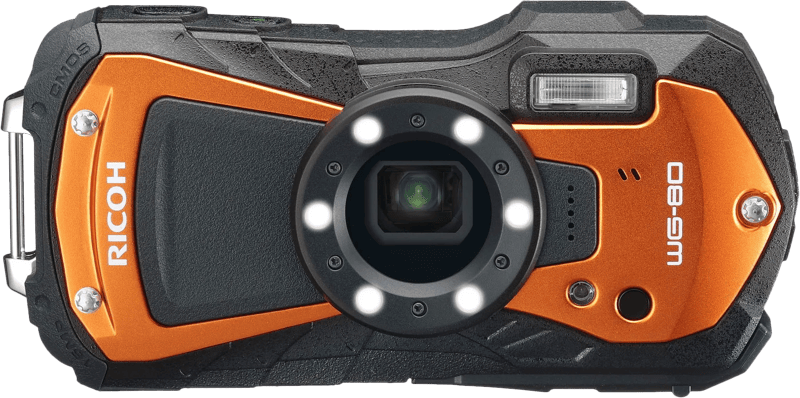
bij 4 winkels, goedkoopst bij Coolblue
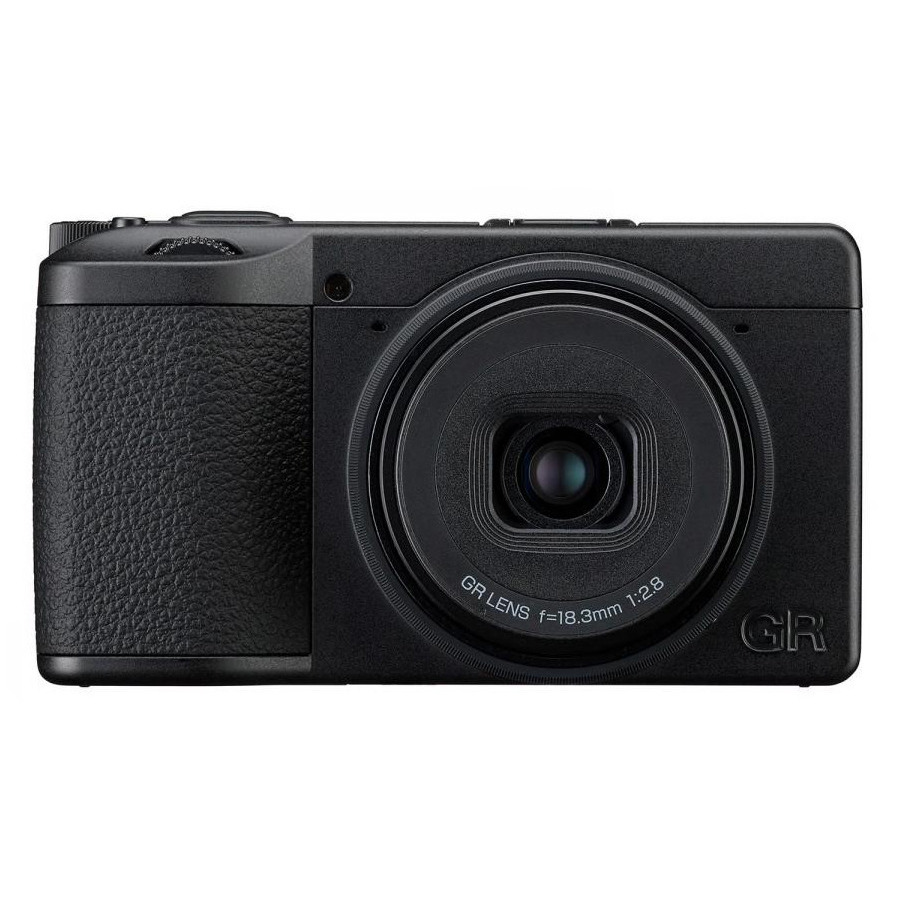
bij 4 winkels, goedkoopst bij Vanden Borre
Vanden Borre