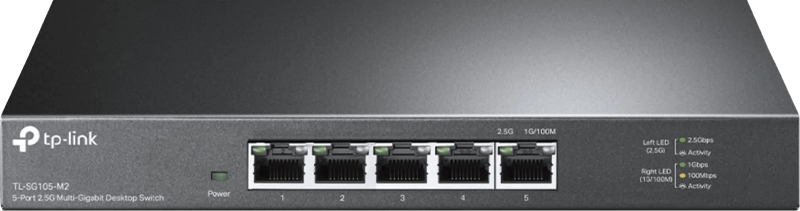
TP-Link TL-SG105-M2
bij 2 winkels, goedkoopst bij Bol
Laagste prijs ooitWij meten de prijs van dit product zelf. In de 45 dagen dat wij het volgen, stond de prijs nooit lager dan nu. Sinds we deze prijs volgen (45 dagen) was hij nooit lager.
€39

De strafste Black Friday deals van België!
De strafste Black Friday deals van België!
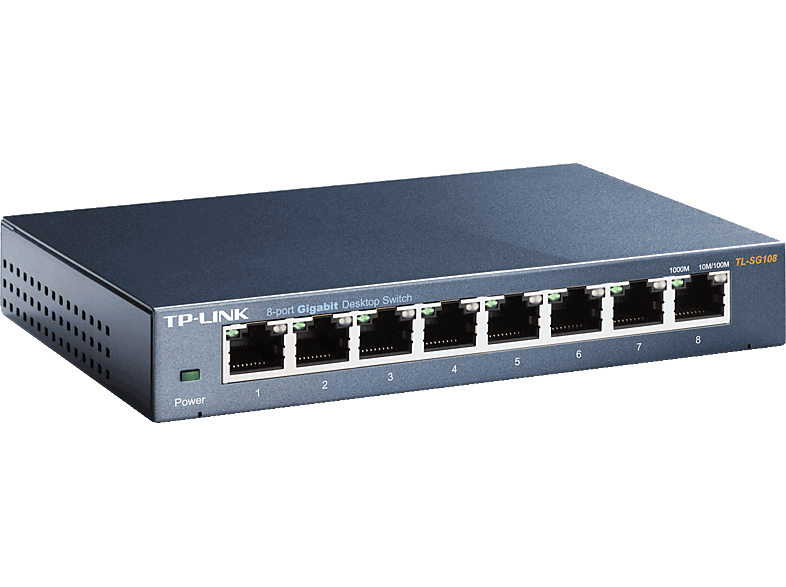
De laagste Black Friday-prijs voor de TP-Link TL-SG108 is € 20,99 (bij 3 winkels vergeleken).
Dat is € 4 goedkoper dan de duurste winkel (€ 24,99).
Nu €20,99. Laat je adres achter en we mailen je zodra de prijs onder jouw bedrag zakt.
Je krijgt eerst een mail om te bevestigen — pas daarna staat de alert aan. Daarna hoogstens één bericht per week, en in elke mail staat een afmeldlink. Vink je de nieuwsbrief niet aan, dan gebruiken we je adres uitsluitend voor dit ene product. De nieuwsbrief is een aparte inschrijving die je los kan opzeggen.
Onze eigen metingen sinds 8 oktober 2026. De laagste prijs die wij in die periode zagen: €20,99.
Wijs een dag aan voor de cijfers, of sleep over de grafiek om in te zoomen.
Vandaag op de laagste prijs die wij ooit gemeten hebben
| Maand | Laagste | Gemiddeld | Hoogste |
|---|---|---|---|
| oktober 2026 | € 22,95 | € 25,99 | € 32,99 |
| november 2026 | € 20,99 | € 25,88 | € 34,99 |
Afgeleid uit de specificaties hieronder en uit onze eigen prijsmetingen — geen mening, wel wat de cijfers betekenen.
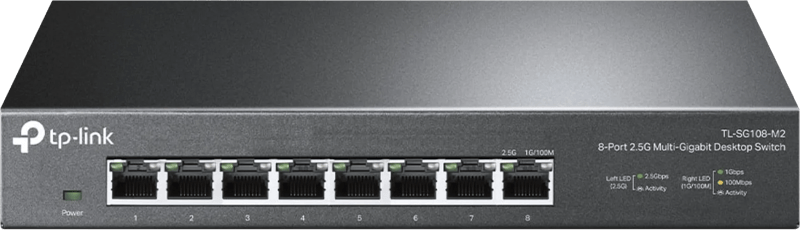
Verhoog eenvoudig de netwerksnelheid thuis of op kantoor met de blauwe 8-Port Desktop Switch (Tl-Sg108) van TP-Link. Je bespaart er ook energie mee, want het stroomverbruik past zich automatisch aan de verbindingsstatus en kabellengte aan. Compact ontwerp De switch heeft een stalen behuizing, kan daardoor tegen een stootje, en is voor zowel wand- als desktopmontage geschikt. Dankzij de compacte afmetingen van 101 x 158 x 25 mm plaats je hem dus waar dat jou het beste uitkomt. De switch beschikt over 8 poorten, naast je modem sluit je bijgevolg nog 7 andere apparaten tegelijk aan. Hij helpt je dus, zowel thuis als op kantoor, online activiteiten sneller uit te voeren. Eenvoudige installatie Dankzij plug-and-play is de installatie eenvoudig en heb je geen hulp van een technicus nodig. Iedere poort registreert de verbindingssnelheid van het aangesloten apparaat en past deze automatisch aan, zodat je van de beste prestaties geniet. De switch is geschikt voor het verzenden van grote bestanden en gaat blokkeringen tegen. Wil je hem op een router aansluiten? Controleer dan eerst of je router over een gigabit-ethernetpoort beschikt. Zo ben je zeker dat je van de maximaal haalbare snelheden gebruik maakt. Energiebesparend Het stroomverbruik past zich automatisch aan de verbindingsstatus en kabellengte aan. De meeste switches zijn namelijk voorzien om kabellengtes tot 100 meter te ondersteunen, terwijl de kabels in realiteit vaak veel korter zijn.
Productinformatie aangeleverd door MediaMarkt.
What switch device has
The type/category of basic switching RJ-45 Ethernet ports (sockets).
The number of basic switching RJ-45 Ethernet ports (sockets).
The MAC address is the 'Media Access Control Address'. It is a unique address given to a network interface controller (NIC) in a device. A MAC address table shows the addresses in a table format.
The type of mounting that can position devices in a shelving system (rack).
Power over Ethernet betekent dat het apparaat stroom kan verzenden of ontvangen via de netwerkkabel, zodat bepaalde aangesloten apparatuur geen verbinding met het stopcontact nodig heeft.
| Quality of Service (QoS) Indicates whether the device supports Quality of Service (QoS) to prioritize specific network traffic to ensure performance for critical applications. | Ja |
|---|---|
| Switch-laag A network switch is a computer networking device that links networking segments. A switch has different layers | L2 |
| Switch type What switch device has | Unmanaged |
| Type basis-switching RJ-45 Ethernet-poorten The type/category of basic switching RJ-45 Ethernet ports (sockets). | Gigabit Ethernet (10/100/1000) |
|---|---|
| Aantal basis-switching RJ-45 Ethernet-poorten The number of basic switching RJ-45 Ethernet ports (sockets). | 8 |
| Datastroombeheer Indicates whether the device supports the management of data transmission rates to prevent buffer overflow. | Ja |
|---|---|
| Auto MDI/MDI-X A Medium Dependent Interface (MDI) describes the interface (both physical and electrical) in a computer network from a physical layer implementation to the physical medium used to carry the transmission. Ethernet over twisted pair also defines a medium dependent interface crossover (MDIX) interface. Auto-MDIX ports on newer network interfaces detect if the connection would require a crossover | Ja |
| Auto-negotiation Indicates whether the device can automatically communicate with a connected network partner to determine the highest common transmission speed and duplex mode. | Ja |
| MAC-adres zelflerende functie Indicates whether the device can automatically discover and store the MAC addresses of connected devices in its address table to optimize data routing. | Ja |
| MAC-adres zelfverouderende functie Indicates whether the device can automatically remove inactive MAC addresses from its address table to optimize memory usage. | Ja |
| Full duplex Een full-duplex-systeem staat tweewegcommunicatie toe en - in tegenstelling tot half-duplex, staat toe dat dit gelijktijdig gebeurt. | Ja |
| Ondersteundende kabel types Specifies the types of cabling compatible with the product (e.g. Cat6, Cat6a). | Cat3, Cat4, Cat5, Cat5e |
| 10G support The product can use Oracle 10G | Nee |
| Netwerkstandaard The way in which the network is working | IEEE 802.1p, IEEE 802.3, IEEE 802.3ab, IEEE 802.3u, IEEE 802.3x |
| Packet buffergeheugen The amount of memory available in the network switch to temporarily store data packets during congestion, typically measured in megabytes (MB) or kilobytes (KB). | 1,5 MB |
|---|---|
| Jumbo frames Indicates the support for Ethernet frames larger than the standard 1500 bytes to increase data transfer efficiency (e.g. 9000 bytes). | 16000 |
| Jumbo Frames ondersteuning Indicates whether the device supports Ethernet frames with a payload larger than the standard 1500 bytes to increase data transfer efficiency. | Ja |
| Store-and-forward Indicates whether the device buffers the entire incoming packet to verify its integrity before forwarding it to the destination. | Ja |
| MAC-adrestabel The MAC address is the 'Media Access Control Address'. It is a unique address given to a network interface controller (NIC) in a device. A MAC address table shows the addresses in a table format. | 4096 entries |
| Verzending snelheid The number of packets the device can process and send per second, measured in millions of packets per second (e.g., 148.8 Mpps). | 11,9 Mpps |
| Switchingcapaciteit The data transfer capacity of the switch per second. | 16 Gbit/s |
| Ophangsysteem voor aan de muur The product can be mounted on (attached to ) a wall. | Ja |
|---|---|
| LED-indicatoren The specific status lights available on the unit to provide visual feedback on its current state or connectivity (e.g., AC input, ACT, or Access). | Ja |
| Kleur De kleur (bvb. rood) | Zwart |
| Rack-montage The type of mounting that can position devices in a shelving system (rack). | Nee |
| IGMP snooping Indicates whether the device can optimize multicast traffic by ensuring it is only forwarded to the ports that have requested it. | Ja |
|---|---|
| Toegangsbeheerlijst (ACL) IPv6-vermeldingen The maximum number of IPv6 access control list entries that can be configured on the device to filter network traffic. | 11 |
| Multicast-ondersteuning Indicates whether the device supports the simultaneous transmission of a single data stream to multiple recipients. | Ja |
|---|
| GARP VLAN Registratieprotocol (GVRP) Indicates whether the device supports the GARP VLAN Registration Protocol (GVRP) for the automatic distribution of VLAN configuration. | Ja |
|---|
| Stroomverbruik (max.) Het verbruik wanneer het toestel het hardst werkt, in watt. Dat is een piek, geen gemiddelde — een tv haalt dit alleen bij het felste beeld. | 3,3 W |
|---|---|
| Netfrequentie De frequentie van het stopcontact, in hertz. In Europa 50 Hz. Enkel van belang bij gebruik buiten Europa. | 50 Hz |
| Netspanning De spanning waarop het toestel werkt. In België is dat 230 volt. Alleen van belang als je het toestel in het buitenland wil gebruiken. | 220 V |
| Vermogenstoevoer inclusief There is a power supply with this product. | Ja |
| Stroom The amount of electrical current drawn by the device during operation, typically measured in amperes (A) or milliamperes (mA). | 0.6 A |
| Power over Ethernet (PoE) Power over Ethernet betekent dat het apparaat stroom kan verzenden of ontvangen via de netwerkkabel, zodat bepaalde aangesloten apparatuur geen verbinding met het stopcontact nodig heeft. | Nee |
|---|
| Luchtvochtigheid bij opslag Relatieve Luchtvochtigheid is de hoeveelheid waterdamp die de lucht bevat in verhouding (in procenten) tot de hoeveelheid water die de lucht bij die temperatuur maximaal zou kunnen bevatten (100%), koude lucht kan bijvoorbeeld minder water bevatten dan warme. Als de lucht afkoelt en de relatieve luchtvochtigheid daardoor boven de 100% komt, condenseert de waterdamp en krijgt men water. | 5 - 90 procent |
|---|---|
| Relatieve vochtigheid in bedrijf (V-V) Relatieve Luchtvochtigheid is de hoeveelheid waterdamp die de lucht bevat in verhouding (in procenten) tot de hoeveelheid water die de lucht bij die temperatuur maximaal zou kunnen bevatten (100%), koude lucht kan bijvoorbeeld minder water bevatten dan warme. Als de lucht afkoelt en de relatieve luchtvochtigheid daardoor boven de 100% komt, condenseert de waterdamp en krijgt men water. | 10 - 90 procent |
| Temperatuur bij opslag The minimum and maximum temperatures at which the product can be safely stored. | -40 - 70 °C |
| Bedrijfstemperatuur (T-T) The minimum and maximum temperatures at which the product can be safely operated. | 0 - 40 °C |
| Hoogte De hoogte van het toestel. Let bij toestellen onder een werkblad ook op de verstelbare pootjes — die geven vaak een paar centimeter speling. | 25 mm |
|---|---|
| Diepte De diepte van het toestel, zonder de slangen en stekkers achteraan. Reken daar nog enkele centimeters bij op. | 101 mm |
| Breedte De breedte van het toestel. Bij inbouw en bij toestellen die in een nis moeten: meet je opening na en houd een centimeter speling voor de aansluitingen achteraan. | 158 mm |
| Gebruiksaanwijzing Indicates whether a user manual or instructional guide is included with the product. | Ja |
|---|---|
| Kabels in de doos Welke kabels erbij zitten. Ontbreekt de kabel die jij nodig hebt, reken er dan een aparte aankoop bij. | AC |
| Snelstartgids Zit er een korte papieren handleiding bij om meteen te beginnen? | Ja |
| Handleiding Zit er een handleiding bij, op papier of digitaal? | Ja |
| Certificering Keurmerken en normen waaraan het toestel voldoet. Vaak verplichte technische vermeldingen, zelden iets waarop je een keuze baseert. | CE, FCC ,RoHS |
|---|
| Type Specifies the design of the attachment used to control the cutting length, such as a fixed, adjustable, or taper style. | netwerk switches |
|---|
| Type verpakking | Doos |
|---|---|
| Code geharmoniseerd systeem (HS) | 85176990 |
50 specificaties, aangeleverd door de fabrikant.
Vandaag is de TP-Link TL-SG108 het goedkoopst bij Coolblue, voor € 20,99. We vergelijken de prijs bij 3 webshops en werken die meerdere keren per dag bij. Het verschil met de duurste winkel is € 4: daar betaal je € 24,99 voor hetzelfde product.
De huidige prijs van € 20,99 is laagste prijs ooit. Sinds we deze prijs volgen (45 dagen) was hij nooit lager. We meten die prijzen zelf, meerdere keren per dag — het is dus niet de "van"-prijs die de winkel zelf opgeeft.
bij 2 winkels, goedkoopst bij Bol
Laagste prijs ooitWij meten de prijs van dit product zelf. In de 45 dagen dat wij het volgen, stond de prijs nooit lager dan nu. Sinds we deze prijs volgen (45 dagen) was hij nooit lager.
bij 3 winkels, goedkoopst bij Vanden Borre
Laagste prijs ooitWij meten de prijs van dit product zelf. In de 45 dagen dat wij het volgen, stond de prijs nooit lager dan nu. Sinds we deze prijs volgen (45 dagen) was hij nooit lager.
bij 3 winkels, goedkoopst bij Coolblue
bij 3 winkels, goedkoopst bij Coolblue
Laagste prijs ooitWij meten de prijs van dit product zelf. In de 45 dagen dat wij het volgen, stond de prijs nooit lager dan nu. Sinds we deze prijs volgen (45 dagen) was hij nooit lager.